

Jingdong e-commerce data batch collection h5st reverse engineering
Practical case website: https://www.jd.com/
Overview
h5st is a "signature pass" used by JD.com's web client (a variant generated by the PC/H5 general basic framework, this case is mainly based on the PC client) to protect core interfaces. It effectively blocks machine requests without real browser context through dynamically obfuscated JavaScript, a combination of algorithms (such as hashes, signatures), and environmental fingerprint binding.
This actual combat will target Jingdong homepage infinite scrolling feed flow interface, analyze the h5st generation link, quickly locate key codes and clarify implementation ideas.
Web analysis
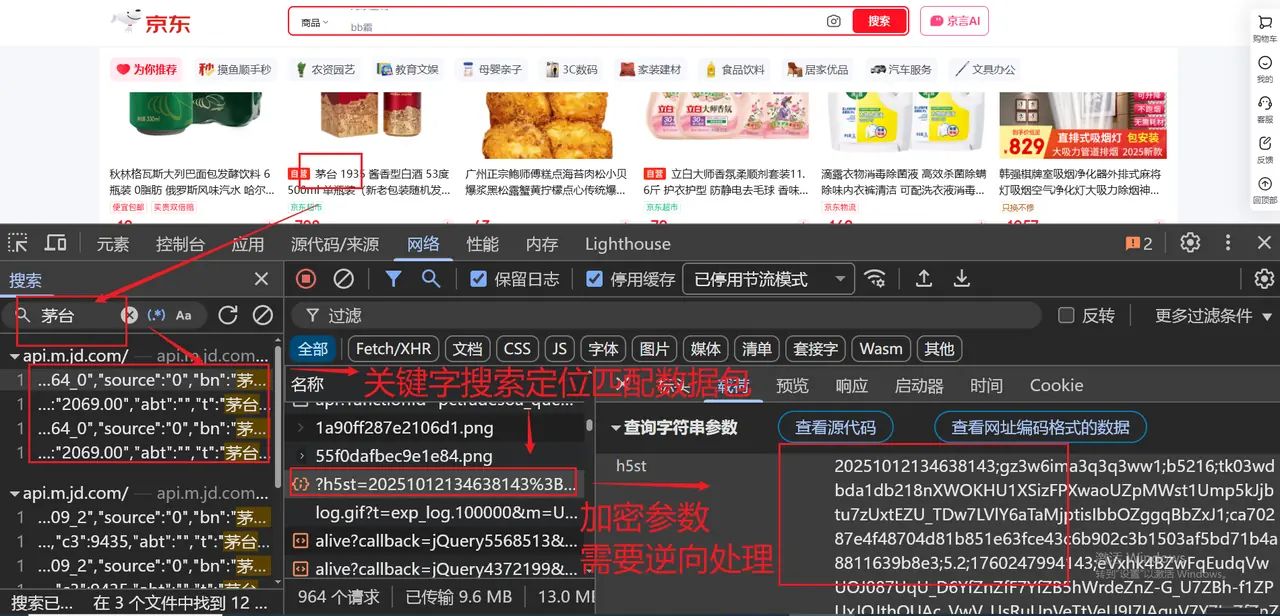
First open the JD.com homepage and pressF12Enter the developer tools and switch to the Network panel:
- Refresh the page and scroll down to trigger infinite loading.
- Enter in the filter field
functionId=pc_home_feed(functionIdis the fixed identifier of the interface). - Find the request that returns the feed content and view the request parameters.
The key request parameters are shown in the screenshot:
Core technical points
Anti-debugging and code obfuscation
- Variable/function name obfuscation: all identifiers replaced with
_$A meaningless name at the beginning. - Control flow flattening: Disrupts the normal order and branching logic of the code, greatly improving the difficulty of reading.
- Strong code compression: remove spaces, newlines, comments, one line to the end.
- Anti-Dynamic Debugging: Detection
debuggerand developer tool status, interfering with breakpoint debugging (the anti-debugging of feed interface related logic is relatively weak).
Key encryption parameters
Core parameters and functions extracted from the request:
Environment completion and key positioning
Quick completion of basic environment
When running obfuscated JS in a non-browser environment such as Node.js, the first step must be to complete the browser core global object, otherwise the code cannot be executed. It is not necessary to complete all attributes at the beginning. Later, you can use Agent Monitoring to locate the missing key attributes.
Agent monitoring system (must use skills)
Agent monitoring can help us quickly locate which environment objects/attributes are accessed by the obfuscated code and avoid blind completion. Here we focus on monitoringwindowand possibly for environmental fingerprintingcanvas:
Although the following code runs in the Node environment, the principle is JavaScript
Proxymechanism.
Load the proxy script together with the obfuscation library. After running, the console will print all access records to facilitate the discovery of uncompleted attributes.
Key code location and analysis
Positioning ideas
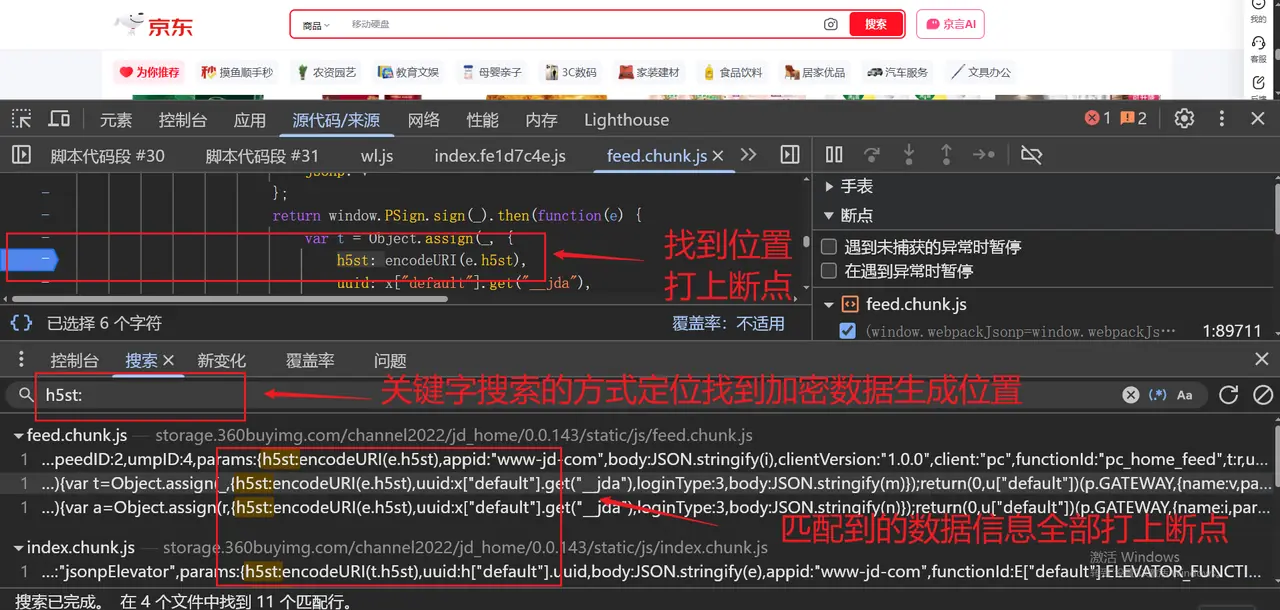
- Keyword global search: In the developer tools
SourcesPanel searchh5st、ParamsSign(observed global object keyword). - XHR/fetch breakpoint: at
网络Right-click the target interface in the panel, select "At Fetch/XHR Break Point", scroll down to trigger the breakpoint, and then view the call stack. - Hook key object: If the global search directly finds the exposed object, just hook it directly.
Core parameters and calling process
In this actual combat, we directly found the global exposure through keyword search.ParamsSignConstructor, the remaining work is to call and pass in the parameters:
At this point, we have obtained the server-side verificationh5stsign.
Other completion ideas
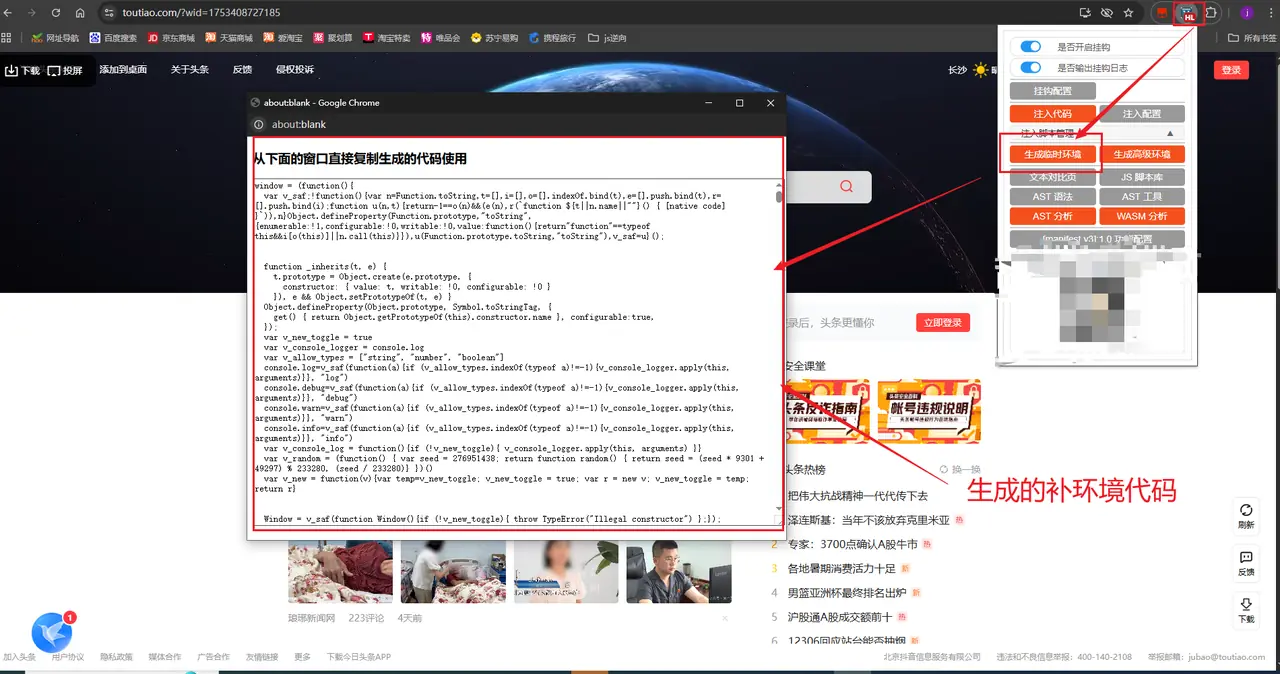
If the obfuscated code does not expose the global constructor, or the environment fingerprint is deeply bound, you can also use the browser plug-in to complete the environment with one click (friends who need it can get it by private message). The plug-in can automatically simulate the browser context and directly output the available signature logic.
Plug-in example picture:

Frequently Asked Questions and Answers
Incomplete environment completion
Phenomenon: An error occurs when Node.js runs obfuscated code.Cannot read properties of undefined (reading 'xxx')
Solution steps:
- Add the objects/properties involved in the error report
proxyArrayRerun. - Observe what is printed on the console
[GET]Logging, missing attributes found. - Add the corresponding simulation value to the basic environment configuration (usually a completely real fingerprint is not required, just pass the "weak verification" of the obfuscation library).
Summarize
This actual combat followed the standard process of "Request Parameter Observation → Basic Environment Completion → Agent Monitoring and Positioning → Keyword Search/Hook Key Object"**, and quickly located the h5st generation entrance of Jingdong PC Feed stream interface.
For deeper algorithm restoration (such as AES key extraction, SHA256 combination rules, etc.), further analysis of the obfuscatedsign()The internal logic of the method, this part will be updated in subsequent notes.