

Practical case: Himalayan audio link reverse engineering

In daily audio tool development or material research, sometimes it is necessary to obtain the real address of the audio. However, platforms like Himalaya often perform lightweight encryption on media streaming links in order to prevent link theft or abuse. This article takes the Himalaya PC album "<URL0>" as an example to dismantle the encryption logic step by step and provide the implementation code for cross-environment (pure JS/Node.js/Python calls).


Reverse web page analysis

First, we open the F12 developer tools and play any audio in the album according to the normal process:

  1. Switch to the Network tab
  2. The filter type is Media, or directly search for audio-related keywords (such as.m4aximalaya.com/audio
  3. Find the request to return the real audio, and scroll up to find "API interface for obtaining encrypted links"
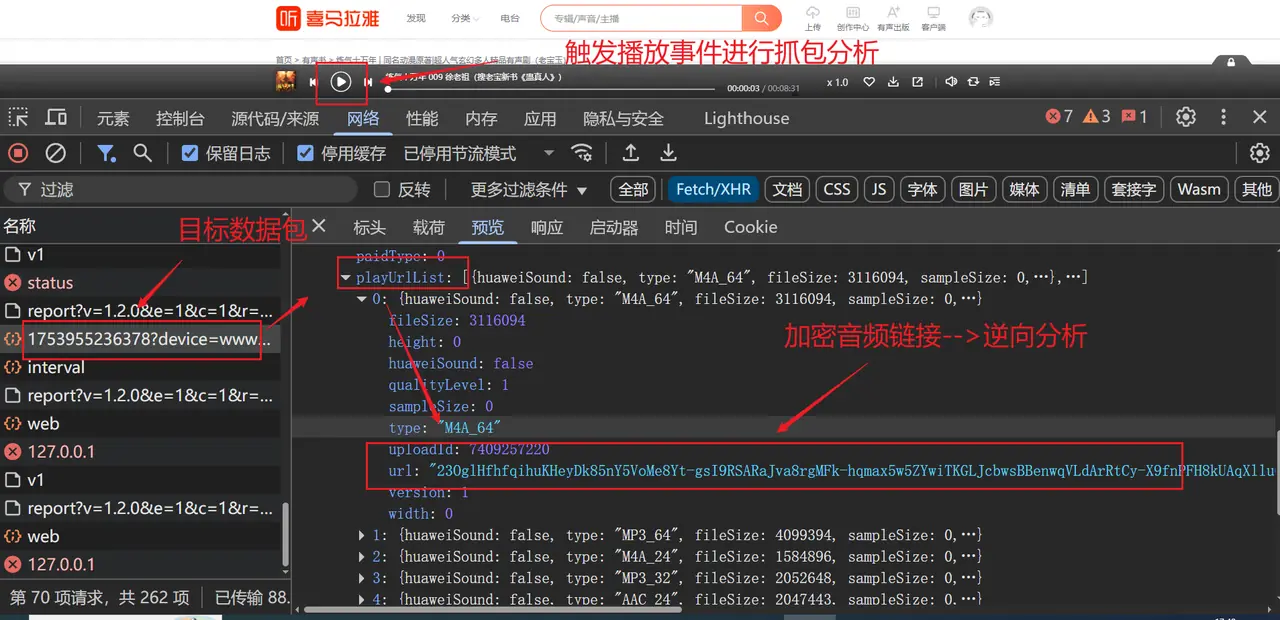
通过Network标签定位加密接口

After getting the encrypted link, we need to find the JS code to decrypt it:

  1. Switch to the Sources tab
  2. Use the Global Search (Ctrl+Shift+F) function to search for the prefix/suffix of the encrypted link, or keywordsdecryptbase64xor
  3. After locating the encryption function, you can directly format it in the developer tools and debug it with breakpoints to verify the logic of each step.
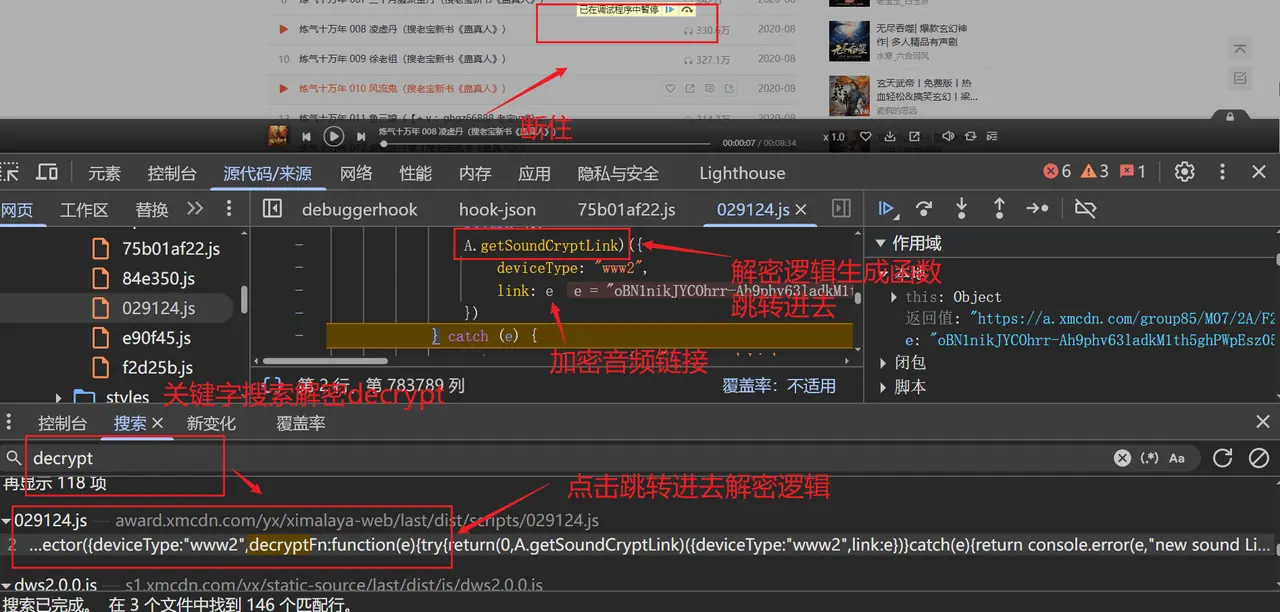
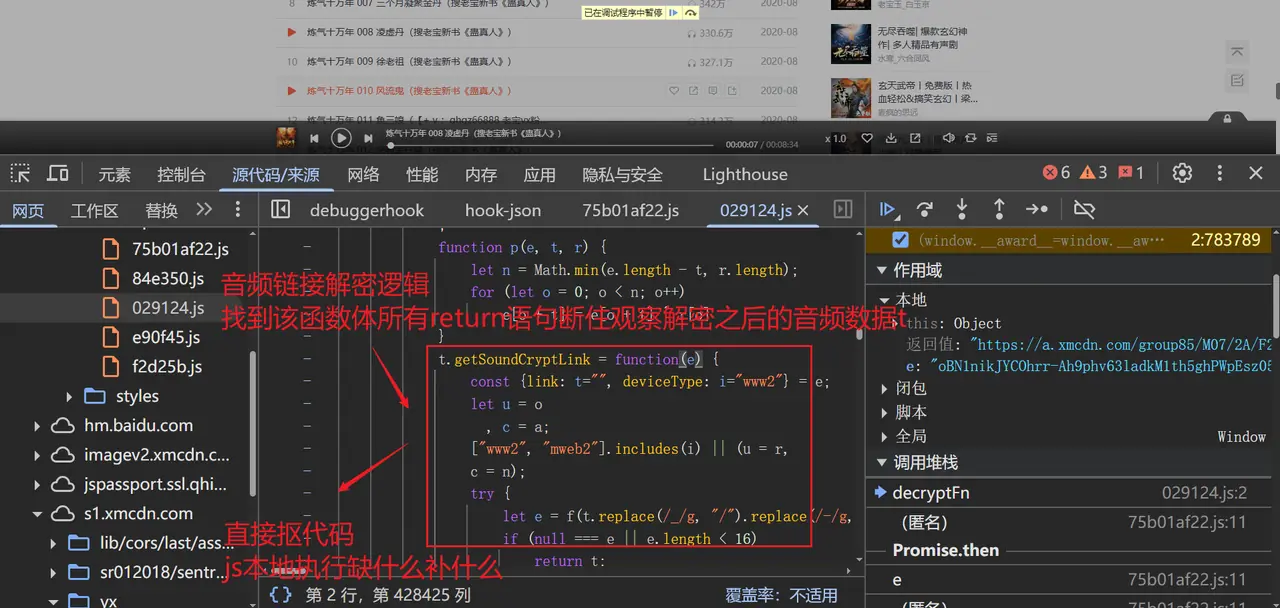
全局搜索定位decrypt函数

断点调试验证解密结果


Reverse core logic

The decrypted code extracted, organized and beautified from the developer tools is as follows:

// 置换表 + 密钥:www1/mobile1
const r = new Uint8Array([188, 174, 178, 234, 171, 147, 70, 82, 76, 72, 192, 132, 60, 17, 30, 127, 184, 233, 48, 105, 38, 232, 240, 21, 47, 252, 41, 229, 209, 213, 71, 40, 63, 152, 156, 88, 51, 141, 139, 145, 133, 2, 160, 191, 11, 100, 10, 78, 253, 151, 42, 166, 92, 22, 185, 140, 164, 91, 194, 175, 239, 217, 177, 75, 19, 225, 94, 107, 125, 138, 242, 31, 182, 150, 15, 24, 226, 29, 80, 116, 168, 118, 28, 1, 186, 220, 158, 79, 59, 244, 119, 9, 189, 161, 74, 130, 221, 56, 216, 241, 212, 26, 218, 170, 85, 165, 153, 69, 238, 93, 255, 142, 3, 159, 215, 67, 33, 249, 53, 176, 77, 254, 222, 25, 115, 101, 148, 16, 13, 237, 197, 5, 58, 157, 135, 248, 223, 61, 198, 211, 110, 44, 54, 111, 52, 227, 4, 46, 205, 7, 219, 136, 14, 87, 114, 64, 104, 50, 39, 203, 81, 196, 43, 163, 173, 109, 108, 187, 102, 195, 37, 235, 65, 190, 113, 149, 143, 8, 27, 155, 207, 134, 123, 224, 129, 245, 62, 66, 172, 122, 126, 12, 162, 214, 90, 247, 251, 124, 201, 236, 117, 183, 73, 95, 89, 246, 181, 179, 83, 228, 193, 99, 6, 45, 112, 32, 154, 128, 230, 131, 206, 243, 57, 84, 146, 0, 35, 96, 250, 137, 36, 208, 103, 34, 68, 204, 231, 144, 120, 98, 202, 49, 210, 23, 200, 18, 86, 55, 121, 20, 199, 97, 167, 180, 169, 106]);
const n = new Uint8Array([20, 234, 159, 167, 230, 233, 58, 255, 158, 36, 210, 254, 133, 166, 59, 63, 209, 177, 184, 155, 85, 235, 94, 1, 242, 87, 228, 232, 191, 3, 69, 178]);

// 置换表 + 密钥:www2/mweb2(默认)
const o = new Uint8Array([183, 174, 108, 16, 131, 159, 250, 5, 239, 110, 193, 202, 153, 137, 251, 176, 119, 150, 47, 204, 97, 237, 1, 71, 177, 42, 88, 218, 166, 82, 87, 94, 14, 195, 69, 127, 215, 240, 225, 197, 238, 142, 123, 44, 219, 50, 190, 29, 181, 186, 169, 98, 139, 185, 152, 13, 141, 76, 6, 157, 200, 132, 182, 49, 20, 116, 136, 43, 155, 194, 101, 231, 162, 242, 151, 213, 53, 60, 26, 134, 211, 56, 28, 223, 107, 161, 199, 15, 229, 61, 96, 41, 66, 158, 254, 21, 165, 253, 103, 89, 3, 168, 40, 246, 81, 95, 58, 31, 172, 78, 99, 45, 148, 187, 222, 124, 55, 203, 235, 64, 68, 149, 180, 35, 113, 207, 118, 111, 91, 38, 247, 214, 7, 212, 209, 189, 241, 18, 115, 173, 25, 236, 121, 249, 75, 57, 216, 10, 175, 112, 234, 164, 70, 206, 198, 255, 140, 230, 12, 32, 83, 46, 245, 0, 62, 227, 72, 191, 156, 138, 248, 114, 220, 90, 84, 170, 128, 19, 24, 122, 146, 80, 39, 37, 8, 34, 22, 11, 93, 130, 63, 154, 244, 160, 144, 79, 23, 133, 92, 54, 102, 210, 65, 67, 27, 196, 201, 106, 143, 52, 74, 100, 217, 179, 48, 233, 126, 117, 184, 226, 85, 171, 167, 86, 2, 147, 17, 135, 228, 252, 105, 30, 192, 129, 178, 120, 36, 145, 51, 163, 77, 205, 73, 4, 188, 125, 232, 33, 243, 109, 224, 104, 208, 221, 59, 9]);
const a = new Uint8Array([204, 53, 135, 197, 39, 73, 58, 160, 79, 24, 12, 83, 180, 250, 101, 60, 206, 30, 10, 227, 36, 95, 161, 16, 135, 150, 235, 116, 242, 116, 165, 171]);

// 环境判断:是否支持原生atob
const hasAtob = "function" == typeof atob;

// 构建Base64字符到索引的映射表(处理填充字符=)
const base64CharMap = ((arr) => {
  let map = {};
  arr.forEach((char, index) => map[char] = index);
  return map;
})(Array.prototype.slice.call("ABCDEFGHIJKLMNOPQRSTUVWXYZabcdefghijklmnopqrstuvwxyz0123456789+/="));

// Base64字符串格式验证正则
const base64Regex = /^(?:[A-Za-z\d+\/]{4})*?(?:[A-Za-z\d+\/]{2}(?:==)?|[A-Za-z\d+\/]{3}=?)?$/;

// 字符转码绑定函数
const fromCharCode = String.fromCharCode.bind(String);

/**
 * 跨环境Base64解码函数
 * 优先使用原生atob,其次Node.js Buffer,最后纯JS实现兜底
 */
const base64Decode = hasAtob
  ? (str) => atob(str.replace(/[^A-Za-z0-9\+\/]/g, ""))
  : (() => {
      try {
        // 尝试Node.js Buffer
        const Buffer = require("buffer").Buffer;
        return (str) => Buffer.from(str, "base64").toString("binary");
      } catch (e) {
        // 纯JS兜底实现
        return (str) => {
          str = str.replace(/\s+/g, "");
          if (!base64Regex.test(str)) throw new TypeError("malformed base64.");
          str += "==".slice(2 - (3 & str.length));
          let result = "", t, r, n;
          for (let i = 0; i < str.length; ) {
            t =
              (base64CharMap[str.charAt(i++)] << 18) |
              (base64CharMap[str.charAt(i++)] << 12) |
              ((r = base64CharMap[str.charAt(i++)]) << 6) |
              (n = base64CharMap[str.charAt(i++)]);
            result +=
              64 === r
                ? fromCharCode((t >> 16) & 255)
                : 64 === n
                ? fromCharCode((t >> 16) & 255, (t >> 8) & 255)
                : fromCharCode((t >> 16) & 255, (t >> 8) & 255, 255 & t);
          }
          return result;
        };
      }
    })();

/**
 * 逐字节XOR异或操作函数
 * @param {Uint8Array} data - 待处理数据数组
 * @param {number} offset - 数据数组的起始偏移量
 * @param {Uint8Array} key - 异或密钥数组
 */
function xorBytes(data, offset, key) {
  const len = Math.min(data.length - offset, key.length);
  for (let i = 0; i < len; i++) {
    data[offset + i] ^= key[i];
  }
}

/**
 * 主解密函数
 * @param {Object} params - 解密参数
 * @param {string} params.link - 加密的音频链接
 * @param {string} [params.deviceType="www2"] - 设备类型(www2/mweb2/www1/mweb1)
 * @returns {string} 真实音频链接
 */
function decrypt(params) {
  const { link = "", deviceType = "www2" } = params;
  // 根据设备类型选择对应的置换表和密钥
  let permutationTable = o;
  let xorKey = a;
  if (!["www2", "mweb2"].includes(deviceType)) {
    permutationTable = r;
    xorKey = n;
  }

  try {
    // 1. 替换Base64变种字符(_→/,-→+)
    const cleanedLink = link.replace(/_/g, "/").replace(/-/g, "+");
    // 2. 跨环境Base64解码
    const decodedBinary = base64Decode(cleanedLink);
    if (!decodedBinary || decodedBinary.length < 16) return link;

    // 3. 拆分数据:前n-16为主体,后16为IV向量
    const bodyLen = decodedBinary.length - 16;
    const bodyData = new Uint8Array(bodyLen);
    const ivData = new Uint8Array(16);
    for (let i = 0; i < bodyLen; i++) {
      bodyData[i] = decodedBinary.charCodeAt(i);
    }
    for (let i = 0; i < 16; i++) {
      ivData[i] = decodedBinary.charCodeAt(bodyLen + i);
    }

    // 4. 主体数据字节置换
    for (let i = 0; i < bodyLen; i++) {
      bodyData[i] = permutationTable[bodyData[i]];
    }

    // 5. 第一轮XOR:按16字节分块,与IV异或
    for (let i = 0; i < bodyLen; i += 16) {
      xorBytes(bodyData, i, ivData);
    }

    // 6. 第二轮XOR:按32字节分块,与固定密钥异或
    for (let i = 0; i < bodyLen; i += 32) {
      xorBytes(bodyData, i, xorKey);
    }

    // 7. UTF-8解码(纯JS实现,兼容低版本)
    const utf8Decode = (bytes) => {
      let result = "", i = 0;
      while (i < bytes.length) {
        let byte = bytes[i++];
        switch (byte >> 4) {
          case 0:
          case 1:
          case 2:
          case 3:
          case 4:
          case 5:
          case 6:
          case 7:
            // 1字节UTF-8
            result += fromCharCode(byte);
            break;
          case 12:
          case 13:
            // 2字节UTF-8
            result += fromCharCode(
              ((byte & 0x1F) << 6) | (bytes[i++] & 0x3F)
            );
            break;
          case 14:
            // 3字节UTF-8
            result += fromCharCode(
              ((byte & 0x0F) << 12) |
                ((bytes[i++] & 0x3F) << 6) |
                (bytes[i++] & 0x3F)
            );
            break;
          case 15:
            // 4字节UTF-8(舍弃高位平面,仅处理低16位)
            result += fromCharCode(
              ((byte & 0x07) << 18) |
                ((bytes[i++] & 0x3F) << 12) |
                ((bytes[i++] & 0x3F) << 6) |
                (bytes[i++] & 0x3F)
            );
            break;
          default:
            break;
        }
      }
      return result;
    };

    return utf8Decode(bodyData);
  } catch (e) {
    return link; // 解密失败,返回原加密链接
  }
}

// 导出解密函数供外部调用
module.exports = decrypt;

Detailed explanation of encryption logic

The entire encrypted link can be disassembled into "Base64 transformation → fixed replacement → double XOR" three steps, the design depends on the device type (www1orwww2) Dynamically select different key tables to increase the difficulty of reverse engineering.

1. Base64 transformation and decoding

In the encrypted link returned by the API,_and-was replaced by/and+, which is the standard URL-safe Base64 variant. When decrypting, first restore it to standard Base64, and then select the decoding method according to the operating environment:

  • Browser environment: use directlyatob()
  • Node.js environment: priorityBuffer.from(str, 'base64'), otherwise fall back to pure JS decoding

The binary string obtained after decoding, beforelength - 16The first byte is the encrypted body data, and the last 16 bytes are the initialization vector (IV).

2. Fixed replacement table (S-Box)

The platform pre-defines a 256-byte length replacement tablepermutationTable, used to scramble the original byte order. Execution process:

for (let i = 0; i < bodyLen; i++) {
  bodyData[i] = permutationTable[bodyData[i]];
}

This step is similar to the SubBytes operation in AES, but the replacement table is hard-coded and captured from the JS code. Each iteration uses the current byte value as the index and takes the new value from the table for replacement.

3. Double XOR diffusion

  • First Round XOR: XOR each block with the IV byte-by-byte in units of 16 bytes.
  • Second round XOR: in 32-byte units, with fixed keyxorKeyXOR, the key comes from the array corresponding to the device type (such as the defaultalength is 32 bytes).

Since the key length is evenly divided by the data length, the second round will completely cover all the data.

4. UTF-8 decoding

The decrypted byte array is actually a UTF-8 encoded text. In order to be compatible with the environment, the code provides a manual UTF-8 decoder to splice multi-byte sequences into the final real audio address according to specifications.


Actual use and calling

Once the decryption is complete, the real audio link can be used for direct download or other operations. For convenience of calling, we willdecryptEncapsulated into modules and supported for use in Node.js or browser environments.

// Node.js 示例
const decrypt = require('./decrypt.js');

const encryptedLink = '...'; // 从 API 获取的加密链接
const realLink = decrypt({
  link: encryptedLink,
  deviceType: 'www2' // 根据实际来源设置
});

console.log('真实链接:', realLink);

If batch decryption is required, just traverse the link array returned by the API and pass in the samedeviceType(Usually albums will use a fixed device type).


Summarize

This article analyzes the lightweight encryption scheme of Himalayan audio streams. The essence is to use Base64 deformation + custom substitution table + double XOR to protect the direct link. The key points to reproduce are:

  • Correctly capture the encrypted link field returned by the API
  • Extract the correct substitution table and XOR key from the JS source code
  • Compatible with Base64 decoding in different operating environments

This case also confirms the general idea of ​​"locating key code → extracting constants → restoring logic" in front-end reverse engineering. If you also need to batch download or analyze such resources, I hope this article can save you some time.