toutiao-abogus-reverse
Overview
The anti-crawling strategies of ByteDance products are highly unified.x-bogusanda_bogusThe series of parameters serve the mobile terminal/some products and PC terminal core business respectively. This article takes the PC headline news feed stream interface as an example to share a reverse method of completing the browser environment + debugging the obfuscated code, and finally generates a verified version in the Node.js environmenta_bogusparameters, and provides Python call examples.
Web page analysis (packet capture and breakpoints)
The complete link of the encrypted call can be sorted out through Chrome developer tools:
-
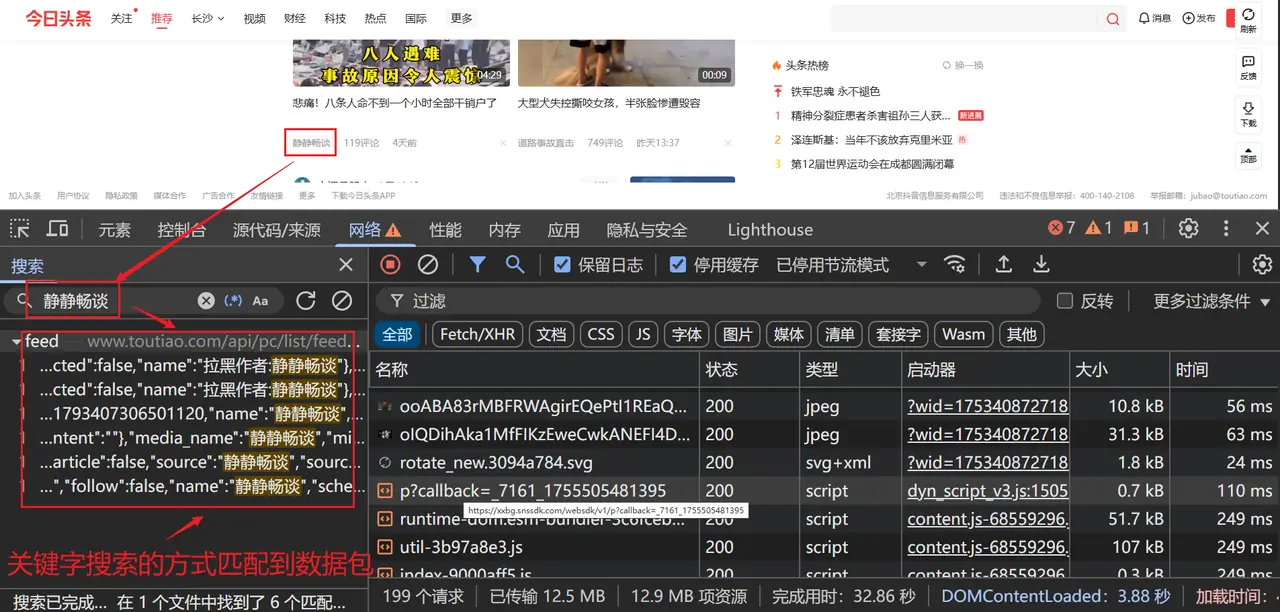
Locate encryption parameters
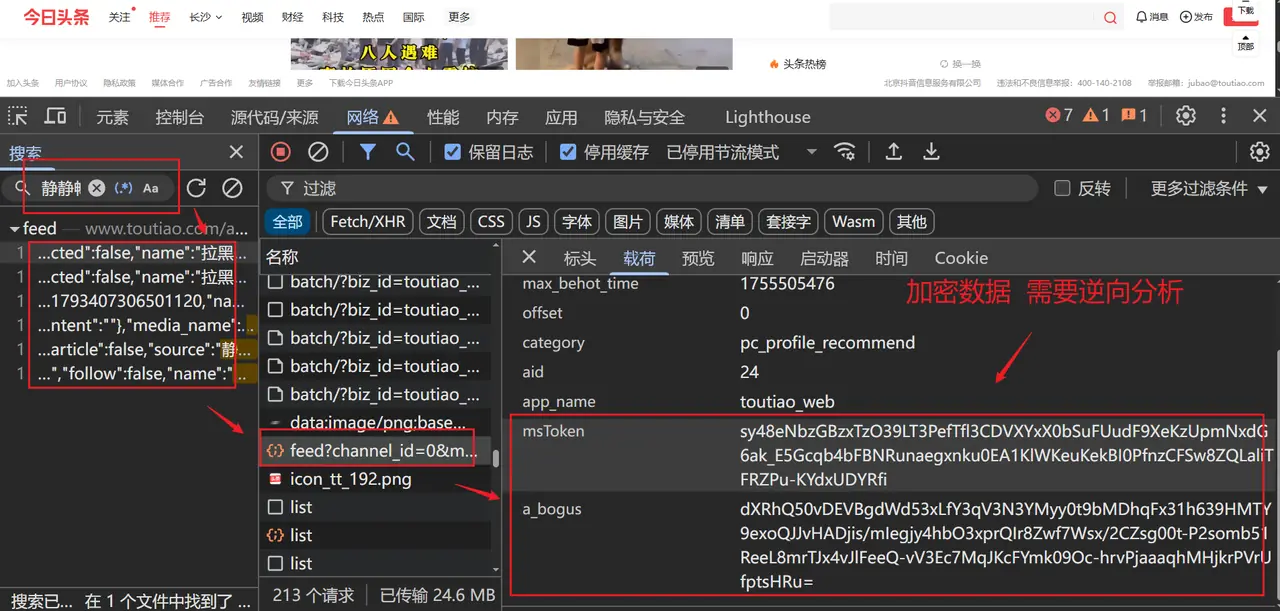
Open the PC homepage and scroll to load, filter in the Network panelfeedFind the target interface and you can see that Query String Parameters contains dynamically generateda_bogus。
-
Global search location call point
Search globally in the Sources panela_bogus, you will find that it appears in a certain encapsulation function that initiates a network request. After setting a breakpoint and continuing to debug, you can trace that it is finally returned by another obfuscated function.
-
Find the obfuscated core file
Continue tracing along the call stack and eventually lock into the dynamically loadedbdms.jsFile - This is the obfuscated fingerprint and encryption script commonly used by ByteDance.
Technical points
Core Difficulties
a_bogusIt is a dynamically generated value based on browser fingerprint + request parametersbdms.jsUses highly obfuscated JavaScript code- Obfuscation logic will actively detect whether the current browser environment is a real one
Solution
- Complete the simulated browser environment object in Node.js (the most critical)
- Reverse the key parameters of the encrypted call chain
- Use
ProxyAgent monitors attribute/method calls to assist in completing missing environments
Environment completion implementation
Basic environment configuration
First initialize the core global objects in the Node.js environmentwindow, and simulate basic window properties, SDK version and other static information:
window = global;
// 补全基础浏览器回调与标签构造函数
window.requestAnimationFrame = function() {};
window.HTMLSpanElement = function() {};
window.EventSource = function() {};
window.XMLHttpRequest = function() {};

// 补全窗口尺寸与位置(需要与抓包时的真实浏览器保持一致)
window.innerWidth = 1920;
window.innerHeight = 331;
window.outerWidth = 1920;
window.outerHeight = 1040;
window.screenX = 0;
window.screenY = 0;
window.pageYOffset = 0;

// 补全 SDK 版本信息(固定值或从真实页面获取)
window._sdkGlueVersionMap = {
    "sdkGlueVersion": "1.0.0.55",
    "bdmsVersion": "1.0.1.7",
    "captchaVersion": "4.0.2"
};
Storage object simulation
localStorageandsessionStoragecached data stored in (especially__tea_*The headline statistics token at the beginning is very important for the integrity verification of the environment:
// 补全 localStorage(token 类数据从真实页面复制即可,无需动态更新)
span = { classList: {} };
localStorage = {
    "__tea_cache_first_2018": "1",
    "__tea_cache_tokens_2018": "{\"web_id\":\"7530833203905971739\",\"user_unique_id\":\"verify_mdi6arfb_JhCmehzG_uZlV_4Uni_95YM_SHlmdFBh8evy\",\"timestamp\":1755420203978,\"_type_\":\"default\"}",
    "__tea_cache_tokens_24": "{\"web_id\":\"7530833195744642610\",\"user_unique_id\":\"7530833195744642610\",\"timestamp\":1755422052831,\"_type_\":\"default\"}",
    "ttcid": "7ddaeb4ae85c4ad3a97a1f5a20f3128a13",
    // 其余非核心缓存可以简化或省略
    getItem: function() {},
    removeItem: function() {}
};

// 补全 sessionStorage
sessionStorage = {
    "__tea_session_id_24": "{\"sessionId\":\"ea368e47-fcc8-4784-b10c-cc8bfe4b1072\",\"timestamp\":1755422548963}",
    getItem: function() {},
    removeItem: function() {}
};
DOM and other object simulation
Continue to completedocument、navigatorRequired properties and methods in the DOM core object:
document = {
    cookie: 'ttcid=7ddaeb4ae85c4ad3a97a1f5a20f3128a13; csrftoken=d50380b8fd876691377e1784f520d987; tt_scid=QqnVBu5PLTT5IYFV0LBt6D0i8IEcZ17Aebn86VJcNa3TruYKbChQ7VMnJCqf4e3-2205',
    createElement: function(tag) {
        if (tag === 'span') return span;
        return {};
    },
    referrer: 'https://www.toutiao.com/?wid=1753408727185',
    documentElement: {},
    createEvent: function() {},
    all: {}
};

navigator = {
    userAgent: 'Mozilla/5.0 (Windows NT 10.0; Win64; x64) AppleWebKit/537.36 (KHTML, like Gecko) Chrome/139.0.0.0 Safari/537.36'
};

screen = {};
history = {};
location = {};
Agent monitoring system
Why do you need an agent?
Confusedbdms.jsA large number of browser properties are surreptitiously accessed (e.g.canvas.toDataURL()、window.screen.colorDepthwait). If you only supplement static values, it is easy to miss some dynamically called objects. useProxyAll accessed objects, properties and methods can be printed out in real time to help quickly locate missing environments.
Agent implementation function
function setProxy(proxyObjArr) {
    for (let i = 0; i < proxyObjArr.length; i++) {
        const handler = `{
            get: function(target, property, receiver) {
                console.log("[GET] 对象:", "${proxyObjArr[i]}", "属性:", property);
                return target[property];
            },
            set: function(target, property, value, receiver) {
                console.log("[SET] 对象:", "${proxyObjArr[i]}", "属性:", property, "值:", value);
                return Reflect.set(...arguments);
            }
        }`;
        eval(`try {
            ${proxyObjArr[i]};
            ${proxyObjArr[i]} = new Proxy(${proxyObjArr[i]}, ${handler});
        } catch (e) {
            ${proxyObjArr[i]} = {};
            ${proxyObjArr[i]} = new Proxy(${proxyObjArr[i]}, ${handler});
        }`);
    }
}

// 初始代理配置(先代理 window 和 canvas,后续根据打印结果补充)
proxy_array = ['window', 'canvas'];
setProxy(proxy_array);
Encryption parameter generation
Encrypted call chain sorting
Drill through breakpointsbdms.js, two core variables will eventually be found:
window._U._v:Basic configuration parameter arraywindow._U._u: core encryption function
get_a_bogus package
After completing the environment and introducing the obfuscation file, the generation function can be encapsulated:
// 先加载混淆的 bdms.js 文件(注意路径)
require("./bdms");

function get_a_bogus(queryStr) {
    // 构造加密所需的参数数组(顺序固定)
    const args_1 = [
        0,          // 固定参数1
        1,          // 固定参数2
        14,         // 固定参数3
        queryStr,   // 需要加密的请求参数(URL 编码后的完整 Query String)
        "",         // 空字符串(通常为额外签名,暂不需填写)
        navigator.userAgent // 浏览器 UA
    ];

    // 获取基础配置
    const r = window._U._v;
    // 调用核心加密函数
    const a_bogus = window._U._u(r[0], args_1, r[1], r[2], null);
    return a_bogus;
}
Complete Python calling process
Encapsulate the above environment completion, agent monitoring (optional, can be commented out for formal use) and encryption functions into the sameenv.jsfile, and then via Python'sexecjslibrary to make calls.
Python Demo code
import requests
import execjs
from urllib.parse import urlencode

# 1. 准备请求参数(与真实页面抓包参数保持一致)
headers = {
    "accept": "application/json, text/plain, */*",
    "accept-language": "zh-CN,zh;q=0.9",
    "cache-control": "no-cache",
    "pragma": "no-cache",
    "priority": "u=1, i",
    "referer": "https://www.toutiao.com/?wid=1753408727185",
    "sec-ch-ua": "\"Not;A=Brand\";v=\"99\", \"Google Chrome\";v=\"139\", \"Chromium\";v=\"139\"",
    "sec-ch-ua-mobile": "?0",
    "sec-ch-ua-platform": "\"Windows\"",
    "sec-fetch-dest": "empty",
    "sec-fetch-mode": "cors",
    "sec-fetch-site": "same-origin",
    "user-agent": "Mozilla/5.0 (Windows NT 10.0; Win64; x64) AppleWebKit/537.36 (KHTML, like Gecko) Chrome/139.0.0.0 Safari/537.36"
}
cookies = {
    "tt_webid": "7530833195744642610",
    "ttcid": "7ddaeb4ae85c4ad3a97a1f5a20f3128a13",
    "csrftoken": "d50380b8fd876691377e1784f520d987",
    "s_v_web_id": "verify_mdi6arfb_JhCmehzG_uZlV_4Uni_95YM_SHlmdFBh8evy",
    "ttwid": "1%7CBXcBsVkKaGJhR8z2otQMXZQ5KyemAE5rZCYmMW7X7Yo%7C1755501182%7C4f426bea4b4347b5a88ccf4f952936fe836cf82bc83a9357735980f36356d1ae"
}
url = "https://www.toutiao.com/api/pc/list/feed"
params = {
    "offset": "0",
    "channel_id": "94349549395",
    "max_behot_time": "0",
    "category": "pc_profile_channel",
    "disable_raw_data": "true",
    "aid": "24",
    "app_name": "toutiao_web",
    "msToken": "rbgPJm26nRNMyXMIjHJoEN2mBaX7RApOkC9YcHYHGSprXqztmiSBt7y7Du9SXXLIrPg3UDzjloBJzp8sSNWZbHPDXzz2qjyc3Dryr0WO07LhQf8qR"
}
# 生成 a_bogus
query_string = urlencode(params)
ctx = execjs.compile(open('env.js', encoding='utf-8').read())
a_bogus = ctx.call('get_a_bogus', query_string)

# 补全参数并发起请求
params['a_bogus'] = a_bogus
response = requests.get(url, headers=headers, cookies=cookies, params=params)
print(response.status_code)
print(response.text[:200])  # 只打印部分响应,验证是否成功
Summary
Reversea_bogusThe core idea is to complete the browser fingerprint of the Node.js environment. passProxyMonitoring can effectively locatebdms.jsAll attributes accessed in the environment can be stably generated locally after the environment is gradually improved. The entire process can be seamlessly integrated into the crawler project to achieve automated data collection.
Tips: Since Toutiao's encryption policy will be dynamically updated, the sample code in this article may become invalid over time. Please refer to the actual reverse engineering, and pay attention to reasonable use and abide by the platform rules.

