

Chapter 3 Building a Vector Knowledge Base
3.1 Vectors and vector knowledge base
3.1.1 Word vectors and vectors
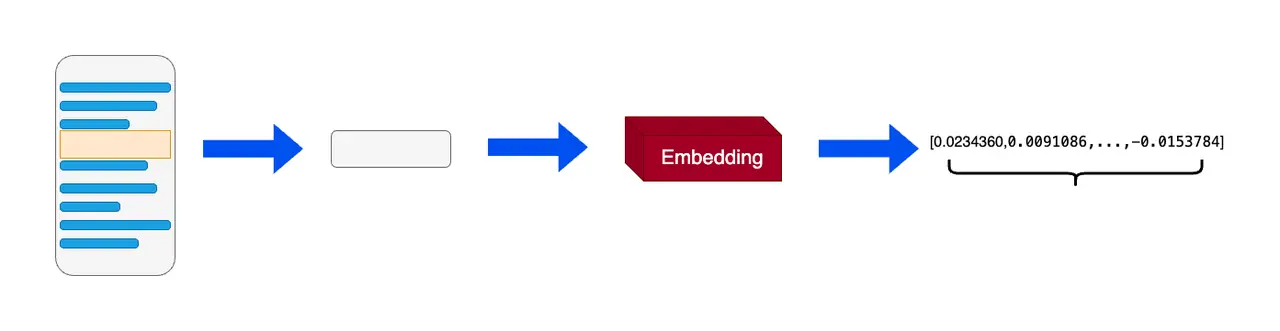 In machine learning and natural language processing (NLP), word embedding is a technique that converts each word into a real vector on a word-by-word basis. These real vectors can be better understood and processed by computers. The main idea behind word vectors is that similar or related objects should be close together in vector space.
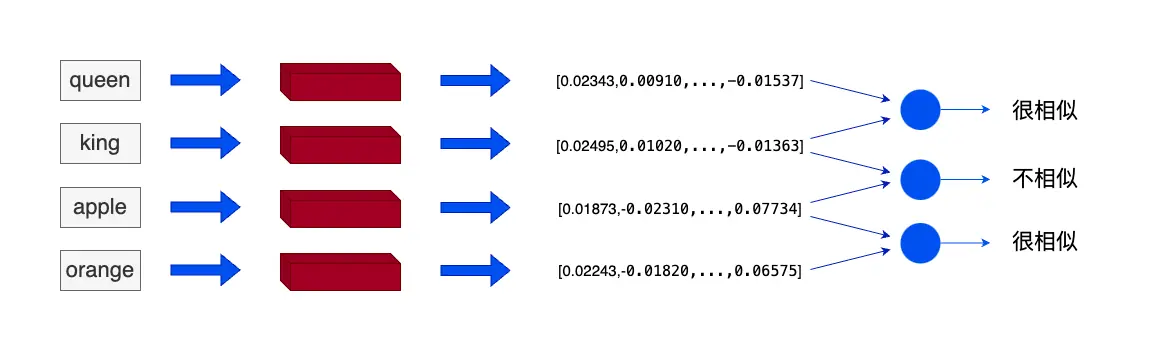 For example, we can use word vectors to represent text data. In word vectors, each word is converted into a vector that captures the semantic information of the word. For example, the words "king" and "queen" will be very close in vector space because they have similar meanings. And "apple" and "orange" will be close because they are both fruits. The two words "king" and "apple" will be far apart in vector space because their meanings are different.
Word vectors actually convert words into fixed, static vectors. Although they can capture and express semantic information in text to a certain extent, they ignore the fact that the meaning of words in different contexts will be affected. Therefore, the vector technology used in RAG applications is generally universal text embedding, which can vectorize text of any length within a certain range. The difference from word vectors is that the unit of vectorization is no longer words but the input text, and the output vector will capture more semantic information.
There are two main advantages of vectors in RAG (Retrieval Augmented Generation):
- Vectors are better for retrieval than text. When we search in the database, if the database stores text, we mainly find relatively matching data by retrieving keywords (lexical search) and other methods. The degree of matching depends on whether the documents in the database contain the keywords in the query sentence; and the vector contains the semantic information of the original text. We can directly obtain the semantic similarity between the question and the data by calculating the dot product, cosine distance, Euclidean distance and other indicators between the question and the data in the database;
- Vectors have stronger comprehensive information capabilities than other media. When traditional databases store text, sound, images, videos and other media, it is difficult to build correlation and cross-modal query methods for the above-mentioned multiple media; however, vectors can map various data into a unified vector form through a variety of vector models.
When building a RAG system, we can often build vectors by using vector models. We can choose:
- Use the Embedding API of each company;
- Use vector models natively to construct data as vectors.
3.1.2 Vector database
Vector databases are solutions for efficient computing and management of large amounts of vector data. A vector database is a database system specifically designed to store and retrieve vector data (embedding). It is different from traditional databases based on relational models. It mainly focuses on the characteristics and similarities of vector data.
In a vector database, data is represented as vectors, with each vector representing a data item. These vectors can be numbers, text, images, or other types of data. Vector databases use efficient indexing and query algorithms to speed up the storage and retrieval process of vector data.
The data in the vector database uses vectors as the basic unit to store, process and retrieve vectors. The vector database obtains the similarity with the target vector by calculating the cosine distance, dot product, etc. with the target vector. When processing large or even massive amounts of vector data, the efficiency of vector database indexing and query algorithms is significantly higher than that of traditional databases.
- Chroma: It is a lightweight vector database with rich functions and simple API. It has the advantages of simplicity, ease of use, and lightweight. However, its functions are relatively simple and does not support GPU acceleration, making it suitable for beginners.
- Weaviate: is an open source vector database. In addition to supporting similarity search and Maximal Marginal Relevance (MMR) search, it can also support hybrid search that combines multiple search algorithms (based on lexical search, vector search), thereby improving the relevance and accuracy of search results.
- Qdrant: Qdrant is developed using the Rust language, has extremely high retrieval efficiency and RPS (Requests Per Second), and supports three deployment modes: local running, deployment on local servers and Qdrant cloud. And data can be reused by formulating different keys for page content and metadata.
3.2 Using Embedding API
Note: In order to facilitate embedding API calls, the key should be filled in the .env file under llm_universe, and the code will automatically read and load the environment variables.
3.2.1 Using OpenAI API
GPT has encapsulated interfaces, we can simply encapsulate them. There are currently three GPT embedding modes, and their performance is as follows:
- MIRACL score is the average score of the embedding model on the retrieval task.
From the above three embedding models, we can see thattext-embedding-3-largeIt has the best performance and the most expensive price, and can be used when the application we build requires better performance and the cost is sufficient;text-embedding-3-smallWith good performance and price, we can choose this model when our budget is limited; andtext-embedding-ada-002It is the previous generation model of OpenAI. It is not as good as the previous two in terms of performance and price, so it is not recommended.
The data returned by the API isjsonformat, exceptobjectIn addition to vector types, there are also ways to store datadata, embedding model modelmodelAnd the usage of this tokenusageand other data, as shown below:
We can call the response object to get the embedding type.
The returned embedding type is: list
Embedding is stored in data. We can check the length of embedding and the generated embedding.
The embedding length is: 1536 embedding (top 10) is: [0.038827355951070786, 0.013531949371099472, -0.0025024667847901583, -0.016542360186576843, 0.02412303350865841, -0.017386866733431816, 0.042086150497198105, 0.011515072546899319, -0.0282362699508667, -0.006800748407840729]
We can also check the model and token usage of this embedding.
This embedding model is: text-embedding-3-small The token usage this time is: Usage(prompt_tokens=12, total_tokens=12)
3.2.2 Using Wenxin Qianfan API
Embedding-V1 is a text representation model based on Baidu Wenxin large model technology. Access token is the certificate for calling the interface. When using Embedding-V1, you should first obtain the Access token with the API Key and Secret Key, and then call the interface through the Access token to embed the text. At the same time, the Qianfan large model platform also supportsbge-large-zhWait for the embedding model.
In addition to a separate ID for each embedding in Embedding-V1, there is also a timestamp to record the embedding time.
This embedding id is: as-h7u5sde3ga The timestamp generated by this embedding is: 1741091715
Similarly, we can also get the embedding type and embedding from the response.
The returned embedding type is: embedding_list The embedding length is: 384 The embedding (top 10) is: [0.060567744076251984, 0.020958080887794495, 0.053234219551086426, 0.02243831567466259, -0.024505289271473885, -0.09820500761270523, 0.04375714063644409, -0.009092536754906178, -0.020122773945331573, 0.015808865427970886]
3.2.3 Using iFlytek Spark API
Things to note when using iFlytek embeddingspark_embedding_domainparameter, which when vectorizing the problem is"query"When vectorizing the knowledge base, it is"para"。
The generated embedding length is: 2560 The embedding (top 10) is: [-0.448486328125, 0.84130859375, 0.67919921875, 0.214599609375, 0.374267578125, 0.384033203125, -0.488525390625, -0.6103515625, 0.1571044921875, 0.81494140625]
3.2.4 Using Zhipu API
Zhipu has a packaged SDK that we can call.
response iszhipuai.types.embeddings.EmbeddingsRespondedtype, we can callobject、data、model、usageTo view the embedding type, embedding, embedding model and usage of the response.
The response type is: <class 'zhipuai.types.embeddings.EmbeddingsResponded'> The embedding type is: list The model that generates embedding is: embedding-3 The generated embedding length is: 2048 The embedding (top 10) is: [-0.0042974288, 0.040918995, -0.0036798029, 0.034753118, -0.047749206, -0.015196704, -0.023666998, -0.002935019, 0.0015090306, -0.011958062]
3.3 Data processing
To build our local knowledge base, we need to process local documents stored in multiple types, read the local documents and convert the contents of the local documents into word vectors through the Embedding method described above to build a vector database. In this section, we start with some practical examples to explain how to process local documents.
3.3.1 Source document selection
We choose some classic open source courses from Datawhale as examples, including:
- 《机器学习公式详解》PDF版本
- 《面向开发者的LLM入门教程、第一部分Prompt Engineering》md版本
We place the knowledge base source data in the ../data_base/knowledge_db directory.
3.3.2 Data reading
For PDF documents, we can use LangChain's PyMuPDFLoader to read the PDF files of the knowledge base. PyMuPDFLoader is one of the fastest PDF parsers, and the results contain detailed metadata of the PDF and its pages, returning one document per page.
After the document is loaded, it is stored inpagesIn variables:
pageThe variable type isList- Print
pagesYou can see how many pages the pdf contains in total
The loaded variable type is: <class 'list'>. The PDF contains a total of 196 pages.
pageEach element in is a document, and the variable type islangchain_core.documents.base.Document, the document variable type contains two attributes
page_contentContains the contents of this document.meta_dataDescriptive data related to the document.
The type of each element: <class 'langchain_core.documents.base.Document'>. ------ Descriptive data for this document: {'source': '../../data_base/knowledge_db/pumkin_book/pumpkin_book.pdf', 'file_path': '../../data_base/knowledge_db/pumkin_book/pumpkin_book.pdf', 'page': 1, 'total_pages': 196, 'format': 'PDF 1.5', 'title': '', 'author': '', 'subject': '', 'keywords': '', 'creator': 'LaTeX with hyperref', 'producer': 'xdvipdfmx (20200315)', 'creationDate': "D:20230303170709-00'00'", 'modDate': '', 'trapped': ''} ------ View the contents of this document: Preface "Teacher Zhou Zhihua's "Machine Learning" (Xigua Book) is one of the classic introductory textbooks in the field of machine learning. In order to make as many readers as possible Readers have some understanding of machine learning through the Xigua book, so the details of the derivation of some formulas are not detailed in the book, but this is useful for those who want to delve deeper into the derivation of formulas. It may not be "friendly" to readers who want to learn details. This book aims to analyze the more difficult-to-understand formulas in Xigua's book and to supplement some formulas. Specific derivation details. " After reading this, you may wonder why the previous paragraph is in quotation marks, because this is just our initial reverie. Later we learned that Zhou The real reason why the teacher omits these derivation details is that he himself believes that “sophomore students with a solid foundation in science and engineering mathematics should learn about Xigua Shu” There is no difficulty in deriving the details in the book. The key points are all in the book. The omitted details should be able to be supplemented by brain or practice." So... this pumpkin book can only be regarded as my I hope that the notes I took down when I was studying on my own will help everyone become a qualified "sophomore with a solid foundation in science and engineering mathematics." "Lost student". Instructions for use • All the contents of the Pumpkin Book are expressed based on the content of the Watermelon Book as pre-knowledge, so the best way to use the Pumpkin Book is to use the Watermelon Book For the main line, refer to the Pumpkin Book when you encounter a formula that you cannot derive or understand; • For beginners who are new to machine learning, it is strongly not recommended to study the formulas in Chapters 1 and 2 of Xigua Book. You can simply go through them and wait until you learn them. When it gets a little drifting, it’s still time to come back and nibble; • We strive (zhi) strive (neng) to explain the analysis and derivation of each formula from the perspective of basic undergraduate mathematics, so the mathematical knowledge beyond the scope We usually provide them in the form of appendices and references. Interested students can continue to study in depth along the materials we provide; • If there is no formula you want to check in the Pumpkin Book, or if you find an error somewhere in the Pumpkin Book, please do not hesitate to go to our GitHub Issues (Address: https://github.com/datawhalechina/pumpkin-book/issues)进行反馈,在对应版块 Submit the formula number or errata information you wish to add, and we will usually reply to you within 24 hours. If we do not reply within 24 hours, If you want, you can contact us via WeChat (WeChat ID: at-Sm1les); Supporting video tutorial: https://www.bilibili.com/video/BV1Mh411e7VU Online reading address: https://datawhalechina.github.io/pumpkin-book(仅供第1 version) The latest version of PDF is available at: https://github.com/datawhalechina/pumpkin-book/releases Editorial Board Editor-in-chief: Sm1les, archwalker, jbb0523 Editorial Board: juxiao, Majingmin, MrBigFan, shanry, Ye980226 Cover design: Concept-Sm1les, Creation-Lin Wangmaosheng Acknowledgments Special thanks to awyd234, feijuan, Ggmatch, Heitao5200, huaqing89, LongJH, LilRachel, LeoLRH, Nono17, spareribs, sunchaothu, StevenLzq for their earliest contributions to the Pumpkin Book. Scan the QR code below and reply with the keyword "Pumpkin Book" to join the "Pumpkin Book Readers Exchange Group" Copyright statement This work is licensed under a Creative Commons Attribution-NonCommercial-ShareAlike 4.0 International License.
For markdown documents we can read them in almost exactly the same way.
The read object is exactly the same as the PDF document read:
The loaded variable type is: <class 'list'>. The Markdown contains a total of 1 page.
The type of each element: <class 'langchain_core.documents.base.Document'>. ------ Descriptive data for this document: {'source': '../../data_base/knowledge_db/prompt_engineering/1. Introduction Introduction.md'} ------ View the contents of this document: Chapter 1 Introduction
Welcome to the Prompt Engineering for Developers section. The content of this section is based on the "Prompt Engineering for Developer" course taught by Andrew Ng. The "Prompt Engineering for Developer" course is taught by Mr. Ng Enda in collaboration with Mr. Isa Fulford, a member of the OpenAI technical team. Mr. Isa has developed the popular ChatGPT search plug-in and is teaching LLM (Larg
3.3.3 Data cleaning
We expect the data in the knowledge base to be as orderly, high-quality, and streamlined as possible, so we need to delete low-quality text data that even affects understanding.
It can be seen that the pdf file read above not only adds line breaks to a sentence according to the lines of the original text\n, also inserted between the original two symbols.\n, we can use regular expressions to match and delete\n。
Preface "Teacher Zhou Zhihua's "Machine Learning" (Xigua Book) is one of the classic introductory textbooks in the field of machine learning. In order to make as many readers as possible Readers have some understanding of machine learning through the Xigua book, so the details of the derivation of some formulas are not detailed in the book, but this is useful for those who want to delve deeper into the derivation of formulas. It may not be "friendly" to readers who want to learn details. This book aims to analyze the more difficult-to-understand formulas in Xigua's book and to supplement some formulas. Specific derivation details. " After reading this, you may wonder why the previous paragraph is in quotation marks, because this is just our initial reverie. Later we learned that Zhou The real reason why the teacher omits these derivation details is that he himself believes that “sophomore students with a solid foundation in science and engineering mathematics should learn about Xigua Shu” There is no difficulty in deriving the details in the book. The key points are all in the book. The omitted details should be able to be supplemented by brain or practice." So... this pumpkin book can only be regarded as my I hope that the notes I took down when I was studying on my own will help everyone become a qualified "sophomore with a solid foundation in science and engineering mathematics." "Lost student". Instructions for use • All the contents of the Pumpkin Book are expressed based on the content of the Watermelon Book as pre-knowledge, so the best way to use the Pumpkin Book is to use the Watermelon Book The main line is the main line. When you encounter a formula that you cannot derive or understand, you can refer to the Pumpkin Book; • For beginners who are new to machine learning, it is strongly not recommended to go into the formulas in Chapters 1 and 2 of the Watermelon Book. Just go through it briefly and wait until you learn it. When you feel a little lost, you can come back to it in time; • We strive to explain the analysis and derivation of each formula from the perspective of basic undergraduate mathematics, so the mathematical knowledge beyond the scope is We usually provide them in the form of appendices and references. Interested students can continue to study in depth along the materials we provide; • If there is no formula you want to check in the Pumpkin Book, or you find an error somewhere in the Pumpkin Book, please do not hesitate to go to our GitHub Issues (Address: https://github.com/datawhalechina/pumpkin-book/issues)进行反馈,在对应版块 Submit the formula number or errata information you wish to add, and we will usually reply to you within 24 hours. If we do not reply within 24 hours, If you want, you can contact us via WeChat (WeChat ID: at-Sm1les); Supporting video tutorial: https://www.bilibili.com/video/BV1Mh411e7VU Online reading address: https://datawhalechina.github.io/pumpkin-book(仅供第1 version) The latest version of PDF is available at: https://github.com/datawhalechina/pumpkin-book/releases Editorial Board Editor-in-chief: Sm1les, archwalker, jbb0523 Editorial Board: juxiao, Majingmin, MrBigFan, shanry, Ye980226 Cover design: Concept-Sm1les, Creation-Lin Wangmaosheng Acknowledgments Special thanks to awyd234, feijuan, Ggmatch, Heitao5200, huaqing89, LongJH, LilRachel, LeoLRH, Nono17, spareribs, sunchaothu, StevenLzq for their early contributions to the Pumpkin Book. Scan the QR code below and reply with the keyword "Pumpkin Book" to join the "Pumpkin Book Readers Exchange Group" Copyright statement This work is licensed under a Creative Commons Attribution-NonCommercial-ShareAlike 4.0 International License.
Further analyzing the data, we found that there are many•and spaces, we can use the replace method to remove them.
Preface "Teacher Zhou Zhihua's "Machine Learning" (Xigua Book) is one of the classic introductory textbooks in the field of machine learning. In order to make as many readers as possible Readers have some understanding of machine learning through the Xigua book, so the details of the derivation of some formulas are not detailed in the book, but this is useful for those who want to delve deeper into the derivation of formulas. It may not be "friendly" to readers who want to learn details. This book aims to analyze the more difficult-to-understand formulas in Xigua's book and to supplement some formulas. Specific derivation details. " After reading this, you may wonder why the previous paragraph is in quotation marks, because this is just our initial reverie. Later we learned that Zhou The real reason why the teacher omits these derivation details is that he himself believes that “sophomore students with a solid foundation in science and engineering mathematics should learn about Xigua Shu” There is no difficulty in deriving the details in the book. The key points are all in the book. The omitted details should be able to be supplemented by brain or practice." So... this pumpkin book can only be regarded as my I hope that the notes I took down when I was studying on my own will help everyone become a qualified "sophomore with a solid foundation in science and engineering mathematics." "Lost student". Instructions for use All the contents of the Pumpkin Book are expressed using the content of the Watermelon Book as pre-knowledge, so the best way to use the Pumpkin Book is to use the Watermelon Book The main line is the main line. When you encounter a formula that you cannot derive or understand, you can refer to the Pumpkin Book. For beginners who are new to machine learning, it is strongly not recommended to go into the formulas in Chapters 1 and 2 of the Watermelon Book. Just go through it briefly and wait until you learn it. When you feel a little lost, you can come back to it in time; we strive to explain the analysis and derivation of each formula from the perspective of basic undergraduate mathematics, so the mathematical knowledge beyond the basics We usually provide them in the form of appendices and references. Interested students can continue to study in depth along the materials we have given; if there is no formula you want to check in the Pumpkin Book, or if you find an error somewhere in the Pumpkin Book, please do not hesitate to go to our GitHub Issues (Address: https://github.com/datawhalechina/pumpkin-book/issues)进行反馈,在对应版块 Submit the formula number or errata information you wish to add. We will usually reply to you within 24 hours. If we do not reply within 24 hours, If you want, you can contact us via WeChat (WeChat ID: at-Sm1les); Supporting video tutorial: https://www.bilibili.com/video/BV1Mh411e7VU Online reading address: https://datawhalechina.github.io/pumpkin-book(仅供第1版) The latest version of PDF is available at: https://github.com/datawhalechina/pumpkin-book/releases Editorial Board Editor-in-chief: Sm1les, archwalker, jbb0523 Editorial Board: juxiao, Majingmin, MrBigFan, shanry, Ye980226 Cover design: Concept-Sm1les, Creation-Lin Wangmaosheng Acknowledgments Special thanks to awyd234, feijuan, Ggmatch, Heitao5200, huaqing89, LongJH, LilRachel, LeoLRH, Nono17, spareribs, sunchaothu, StevenLzq for their early contributions to the Pumpkin Book. Scan the QR code below and reply with the keyword "Pumpkin Book" to join the "Pumpkin Book Readers Exchange Group" Copyright statement This work is licensed under a Creative Commons Attribution-NonCommercial-ShareAlike 4.0 International License.
Each section of the md file read above is separated by a newline character. We can also use the replace method to remove it.
Chapter 1 Introduction Welcome to the Prompt Engineering for Developers section. The content of this section is based on the "Prompt Engineering for Developer" course taught by Andrew Ng. The "Prompt Engineering for Developer" course is taught by Mr. Ng Enda in cooperation with Mr. Isa Fulford, a member of the OpenAI technical team. Mr. Isa has developed the popular ChatGPT search plug-in and has made great contributions in teaching the application of LLM (Large Language Model) technology in products. She also co-wrote the OpenAI cookbook that teaches people to use Prompt. We hope that through studying this module, we can share with you the best practices and techniques for developing LLM applications using prompt words. There is a lot of material on the Internet about prompt word (prompt (this term will be retained in this tutorial)) design, such as articles such as "30 prompts everyone has to know". These articles mainly focus on the web interface of ChatGPT, which many people use to perform specific, usually one-time tasks. But we believe that for developers, the more powerful feature of large language models (LLM) is that it can be called through API interfaces to quickly build software applications. In fact, we learned that the team at DeepLearning.AI’s sister company AI Fund has been working with many startups to apply these technologies to many applications. It’s exciting to see how the LLM API enables developers to build applications very quickly. In this module, we will share with readers various techniques and best practices to improve the application effect of large language models. The book covers a wide range of topics, including typical application scenarios of language models such as software development prompt word design, text summary, reasoning, conversion, expansion, and building chat robots. We sincerely hope that this course will inspire readers to develop better language model applications. With the development of LLM, it can be roughly divided into two types, later called basic LLM and instruction fine-tuned (Instruction Tuned) LLM. The basic LLM is based on text training data to train a model with the ability to predict the next word. It is typically trained on large amounts of data from the Internet and other sources to determine the most likely words that follow. For example, if you take "Once upon a time, there was a unicorn" as a prompt, the base LLM might go on to predict "She lived in a magical forest with her unicorn friends." However, if you take "What is the capital of France" as the prompt, the basic LLM may predict the answer as "What is the largest city in France? What is the population of France?" based on articles on the Internet, because the articles on the Internet are likely to be a list of question and answer questions about the country of France. Unlike basic language models, instruction fine-tuning LLM can better understand and follow instructions through specialized training. For example, when asked "What is the capital of France?", this type of model is likely to directly answer "The capital of France is Paris." The training of instruction fine-tuning LLM is usually based on a pre-trained language model. It is first pre-trained on large-scale text data to master the basic laws of language. On this basis, further training and fine-tuning (finetune) are performed. The input is the instructions and the output is the correct reply to these instructions. Sometimes RLHF (reinforcement learning from human feedback, human feedback reinforcement learning) technology is also used to further enhance the model's ability to follow instructions based on human feedback on the model output. through this controlled training process. Instruction fine-tuning LLM can produce output that is highly sensitive to instructions, more safe and reliable, and less irrelevant and damaging. therefore. Many practical applications have turned to using such large language models. Therefore, this course will focus on best practices for fine-tuning LLMs for instructions, which we recommend for most use cases. When you use instructions to fine-tune an LLM, you can analogize it to giving instructions to another person (assuming that person is smart but doesn't know the specific details of your task). So when LLM doesn't work properly, sometimes it's because the instructions aren't clear enough. For example, if you want to ask "Write something for me about Alan Turing," it might be more helpful to make it clear that you want the text to focus on his scientific work, personal life, historical role, or other aspects. In addition, you can also specify the tone of your answer to better meet your needs. Options include writing by a professional reporter or an essay written to a friend. If you think of the LLM as a new graduate and asking him to complete this task, you can even specify in advance which text fragments they should read to write a text about Alan Turing, which can help the new graduate complete this task better. The next chapter of this book explains in detail two key principles of prompt word design: clarity and sufficient time to think.
3.3.4 Document segmentation
Since the length of a single document often exceeds the context supported by the model, the retrieved knowledge is too long and exceeds the processing capacity of the model. Therefore, in the process of building a vector knowledge base, we often need to segment the document and divide the single document into several chunks according to length or fixed rules, and then convert each chunk into a word vector and store it in the vector database.
During retrieval, we will use chunk as the meta-unit of retrieval, that is, k chunks retrieved each time will be used as knowledge that the model can refer to to answer user questions. This k can be set freely by us.
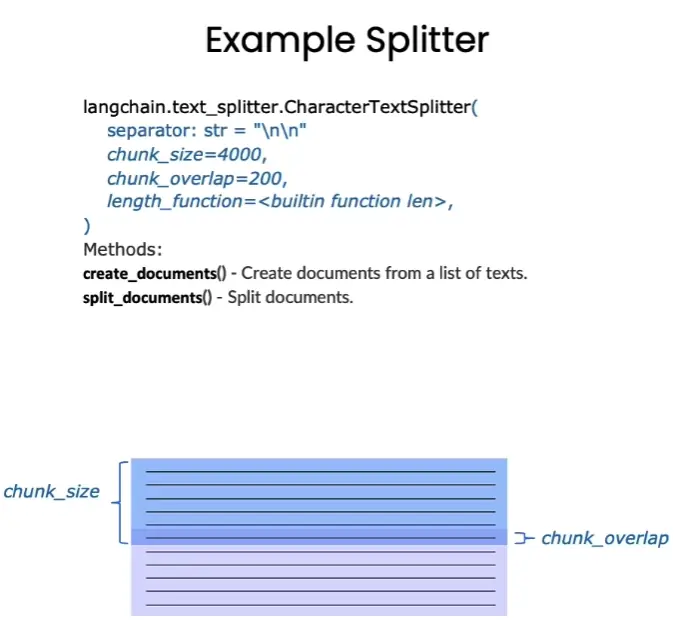
Langchain Chinese text splitters are based onchunk_size(block size) andchunk_overlap(overlap size between blocks) to split.
-
chunk_size refers to the number of characters or Tokens (such as words, sentences, etc.) contained in each chunk
-
chunk_overlap refers to the number of characters shared between two chunks, which is used to maintain the coherence of the context and avoid losing context information during segmentation
Langchain provides a variety of document segmentation methods. The difference lies in how to determine the boundaries between blocks, which characters/tokens a block consists of, and how to measure the block size.
- RecursiveCharacterTextSplitter(): Split text by string, recursively try to split text by different separators.
- CharacterTextSplitter(): Split text by characters.
- MarkdownHeaderTextSplitter(): Split markdown files based on the specified header.
- TokenTextSplitter(): Split text by token.
- SentenceTransformersTokenTextSplitter(): Split text by token
- Language(): for CPP, Python, Ruby, Markdown, etc.
- NLTKTextSplitter(): Split text by sentences using NLTK (Natural Language Toolkit).
- SpacyTextSplitter(): Use Spacy to split text by sentence.
['Preface\n"Teacher Zhou Zhihua's "Machine Learning" (Xigua Book) is one of the classic introductory textbooks in the field of machine learning. In order to let as many readers as possible\n learn about machine learning through Xigua Book, Teacher Zhou does not elaborate on the derivation details of some formulas in the book. However, this may not be "unfriendly" to readers who want to delve into the details of formula derivation\n. This book aims to analyze the more difficult to understand formulas in Xigua Book, and to explain some of them. The formula adds\nspecific derivation details. "\nAfter reading this, you may wonder why the quotation marks are added to the previous paragraph, because this is just our initial reverie. Later we learned that Teacher Zhou omitted these deductions. The real reason for explaining the details is that he personally believes that "sophomore students with a solid foundation in science and engineering mathematics should have no difficulty with the details of the derivation in the Xigua book\n. The key points are all in the book, and the omitted details should be able to make up for it in their heads or do exercises." So... this pumpkin book can only be regarded as the notes that I\nother math bastards took down when they were studying on their own. I hope it can help everyone become a qualified "sophomore student with a solid foundation in mathematics in science and engineering." \nInstructions for use\nAll the contents of the Pumpkin Book are expressed with the content of the Watermelon Book as pre-knowledge, so the best way to use the Pumpkin Book is to use the Watermelon Book\n as the main line. When you encounter formulas that you cannot derive or understand, refer to the Pumpkin Book; for beginners who are new to machine learning, it is strongly not recommended to go into the formulas in Chapters 1 and 2 of the Watermelon Book. Just go through it briefly and wait until you learn it', 'When I feel a little lost, I can come back to read it in time; we strive to explain the analysis and derivation of each formula from the perspective of undergraduate mathematics basics, so the mathematical knowledge beyond the program\n is usually given in the form of appendices and references. If you are interested Interested students can continue to study in depth along the materials we have provided; if there is no formula you want to check in the Pumpkin Book, or if you find an error somewhere in the Pumpkin Book, please do not hesitate to go to our GitHub\nIssues (Address: https://github.com/datawhalechina/pumpkin-book/issues)进行反馈,在对应版块\n提交你希望补充的公式编号或者勘误信息,我们通常会在24小时以内给您回复,超过24小时未回复的\n话可以微信联系我们(微信号:at-Sm1les);\n配套视频教程:https://www.bilibili.com/video/BV1Mh411e7VU\n在线阅读地址:https://datawhalechina.github.io/pumpkin-book(仅供第1版)\n最新版PDF获取地址:https://github.com/datawhalechina/pumpkin-book/releases\n编委会', 'Editorial Board\nEditor-in-Chief: Sm1les, archwalker']
Number of files after splitting: 711
Number of characters after segmentation (can be used to roughly evaluate the number of tokens): 305816
Note: How to segment documents is actually the core step in data processing, which often determines the lower limit of the retrieval system. However, how to choose the segmentation method often has strong business relevance - for different businesses and different source data, it is often necessary to set personalized document segmentation methods. Therefore, in this chapter, we simply split documents based on chunk_size. For readers who are interested in further exploration, you are welcome to read the project examples in Part 3 to refer to how existing projects perform document segmentation.
3.4 Build and use vector database
3.4.1 Preorder configuration
The focus of this section is to build and use a vector database, so after reading the data, we will skip the data processing and go straight to the topic. For data cleaning and other steps, please refer to Section 3.
['../../data_base/knowledge_db/prompt_engineering/6. Text Transformation Transforming.md', '../../data_base/knowledge_db/prompt_engineering/4. Text summary Summarizing.md', '../../data_base/knowledge_db/prompt_engineering/5. Inferring.md']
The variable type after loading islangchain_core.documents.base.Document, the document variable type also contains two attributes
page_contentContains the contents of this document.meta_dataDescriptive data related to the document.
The type of each element: <class 'langchain_core.documents.base.Document'>. ------ Descriptive data for this document: {'source': '../../data_base/knowledge_db/prompt_engineering/4. Text Summary Summarizing.md'} ------ View the contents of this document: Chapter 4 Text Summary
In the busy information age, Xiao Ming is an enthusiastic developer and faces the challenge of processing massive text information. He needed to research countless documents to find key information for his project, but there was never enough time. When he was struggling, he discovered the text summarization function of large language models (LLM).
This function is like a beacon to Xiao Ming, illuminating his way to deal with the ocean of information. The powerful ability of LLM is that it can simplify complex text information and extract key points, which is undoubtedly a huge help to him. He no longer needs to spend a lot of time reading all the documents, he only needs to use LLM to summarize them, and he can quickly obtain the information he needs.
By calling the API interface programmatically, Xiao Ming successfully implemented this text summary function. He sighed: "This is like magic, turning the endless ocean of information into a clear source of information." Xiao Ming's experience demonstrates the huge advantages of LLM's text summary function: saving time, improving efficiency, and accurately obtaining information. This is what we are going to introduce in this chapter. Let us explore how to use programming and call API interfaces to master this powerful tool.
- Single text summary
Take the task of summarizing product reviews as an example: For e-commerce platforms, there are often a large number of product reviews on the website, and these reviews reflect the thoughts of all customers. If we have a tool to summarize these massive and lengthy reviews, we can quickly browse more reviews and gain insight into customer preferences, thereby guiding the platform and merchants to provide better services.
Next, we provide an online product review as an example, which may come from an online shopping platform, such as Amazon, Taobao, JD.com, etc. The evaluator reviewed a panda doll. The evaluation included factors such as the quality, size, price, and logistics speed of the product, as well as how much his daughter liked the product.
python prod_review = """ This panda doll is a birthday gift for my daughter. She likes it very much and takes it with her everywhere. The doll is soft, super cute, and has a kind facial expression. But compared to the price, it is a bit small. I feel that I can buy a bigger one at the same price elsewhere. The express arrived one day earlier than expected, so I played with it myself before giving it to my daughter. """
1.1 Limit the length of output text
We first try to limit the length of the text to 30 words.
The panda doll is soft and cute, and my daughter likes it, but it’s a bit small. The express arrived one day early.
We can see that the language model gives us a result that meets the requirements.
Note: In the previous section we mentioned that language models rely on tokenizers when calculating and judging text length, and tokenizers do not have perfect accuracy in character statistics.
1.2 Set key angles to focus on
In some cases, we will focus on the text differently for different business scenarios. For example, in product review text, the logistics department may focus more on the timeliness of transportation, the merchant may focus more on price and product quality, and the platform may focus more on the overall user experience.
We can emphasize our emphasis on a specific perspective by enhancing the input prompt (Prompt).
1.2.1 Focus on express delivery services
The express arrived early. The doll is cute but a bit small.
From the output results, we can see that the text begins with "Express delivery arrives in advance", which reflects the emphasis on express delivery efficiency.
1.2.2 Focus on price and quality
Cute panda figurine, good quality but a bit small and slightly expensive. The express arrived early.
From the output results, we can see that the text begins with "Cute panda doll, good quality but a bit small, price slightly high", which reflects the emphasis on product price and quality.
1.3 Key information extraction
In Section 1.2, although we did make the text summary more focused on a specific aspect by adding a Prompt that focuses on the key perspective, we can find that some other information will also be retained in the results. For example, the summary that focuses on the price and quality perspectives still retains the information of "express arrival early". If we only want to extract information from a certain angle and filter out all other information, we can ask LLM to perform text extraction (Extract) instead of summarizing (Summarize).
Let’s extract information from the text together!
Information related to product transportation: Express delivery arrives one day in advance.
- Summarize multiple texts at the same time
In actual workflows, we often have to deal with a large amount of review text. The following example collects multiple user reviews in a list, and uses a for loop and text summary (Summarize) prompt words to summarize the reviews to less than 20 words and print them in order. Of course, in actual production, for comment texts of different sizes, in addition to using for loops, you may also need to consider integrating comments, distribution and other methods to improve computing efficiency. You can build a main control panel to summarize a large number of user comments and facilitate quick browsing by you or others. You can also click to view the original comments. In this way, you can effectively capture all the thoughts of your customers.
Comment 1: The panda doll is a birthday gift. My daughter likes it. It is soft and cute and has a kind facial expression. The price is a bit small, and the express arrived one day early.
Review 2: Beautiful bedroom lamp, storage function, fast delivery, light cord problem, quick fix, easy to assemble, care about customers and product.
Comment 3: This electric toothbrush has good battery life, but the toothbrush head is too small. The price is reasonable and the cleaning effect is good.
Comment 4: This review mentions a 17-piece set that was on sale in November but saw a price increase in December. Reviewers mentioned the appearance and use of the product, as well as issues with the product's declining quality. Finally, the reviewer mentioned that they purchased another blender.
- English version
1.1 Single text summary
1.2 Set key angles to focus on
1.2.1 Focus on express delivery services
1.2.2 Focus on price and quality
1.3 Key information extraction
2.1 Summarize multiple texts at the same time
3.4.2 Build Chroma vector library
Langchain integrates with over 30 different vector repositories. We chose Chroma because it is lightweight and data is stored in memory, which makes it very easy to launch and start using.
LangChain can directly use the Embedding of OpenAI and Baidu Qianfan. At the same time, we can also customize the Embedding API that it does not support. For example, we can encapsulate a zhipuai_embedding based on the interface provided by LangChain to connect the Embedding API of Zhipu to LangChain. In this chapter [Attached explanation of LangChain custom Embedding encapsulation], we take the Zhipu Embedding API as an example to introduce how to encapsulate other Embedding APIs into LangChain , interested readers are welcome to read.
**Note: If you use the Zhipuai API, you can refer to the explanation to implement the encapsulated code, or you can directly use our encapsulated code [zhipuai_embedding.py], download the code to the same level directory of this Notebook, and then you can directly import our encapsulated functions. In the following code Cell, we use Zhipu's Embedding by default, and present the other two Embedding usage codes in a comment method. If you are using Baidu API or OpenAI API, you can use the code in the Cell below according to the situation. **
Number stored in vector library: 1004
3.4.3 Vector retrieval
Chroma's similarity search uses cosine distance, that is: Among them, and are the components of vectors and respectively.
You can use it when you need the database to return results strictly sorted by cosine similarity.similarity_searchfunction.
Number of items retrieved: 3
The 0th content retrieved: There is a lot of material on the Internet about prompt word (prompt (this term will be retained in this tutorial)) design, such as articles such as "30 prompts everyone has to know". These articles mainly focus on the web interface of ChatGPT, which many people use to perform specific, usually one-time tasks. But we believe that for developers, the more powerful feature of large language models (LLM) is that it can be called through API interfaces to quickly build software applications. In fact, we learned that Deep -------------- The first content retrieved: Chapter 6 Text Conversion
The large language model has powerful text conversion capabilities and can realize different types of text conversion tasks such as multi-language translation, spelling correction, grammar adjustment, and format conversion. Using language models to perform various transformations is one of its typical applications.
In this chapter, we will introduce how to call the API interface through programming and use the language model to implement the text conversion function. Through code examples, readers can learn specific methods to convert input text into the desired output format.
Mastering the skill of calling large language model interfaces for text conversion is an important step in developing various language applications. arts -------------- The 2nd content retrieved: Total cost for student calculations: 100,000 Actual calculated total cost: 360x+$100,000 Are student calculated fees and actual calculated fees the same: No Are the student's solution and the actual solution the same: No Student Grade: Incorrect
- Limitations
When developing applications related to large models, please remember:
False knowledge: The model occasionally generates knowledge that appears to be real but is actually made up.
When developing and applying language models, one needs to be aware of the risk that they may generate false information. Although the model has been extensively pre-trained and has a wealth of knowledge, it --------------
If you only consider the relevance of the retrieved content, the content will be too single and important information may be lost.
maximum marginal correlation (MMR, Maximum marginal relevance) can help us increase the richness of our content while remaining relevant.
The core idea is to select a document that is less relevant to the selected document but rich in information after a highly relevant document has been selected. This can increase the diversity of content while maintaining relevance and avoid overly monotonous results.
The 0th content retrieved by MMR: There is a lot of material on the Internet about prompt word (prompt (this term will be retained in this tutorial)) design, such as articles such as "30 prompts everyone has to know". These articles mainly focus on the web interface of ChatGPT, which many people use to perform specific, usually one-time tasks. But we believe that for developers, the more powerful feature of large language models (LLM) is that it can be called through API interfaces to quickly build software applications. In fact, we learned that Deep -------------- The first content retrieved by MMR: Total cost for student calculations: 100,000 Actual calculated total cost: 360x+$100,000 Are student calculated fees and actual calculated fees the same: No Are the student's solution and the actual solution the same: No Student Grade: Incorrect
- Limitations
When developing applications related to large models, please remember:
False knowledge: The model occasionally generates knowledge that appears to be real but is actually made up.
When developing and applying language models, one needs to be aware of the risk that they may generate false information. Although the model has been extensively pre-trained and has a wealth of knowledge, it -------------- The 2nd content retrieved by MMR: Line derivation. For any sample, without considering the sample itself (that is, a priori), if you make a blind guess at the probability that it is generated by the i-th Gaussian mixture component P (zj = i), then guessing must be based on the prior probabilities α1, α2, . . . , αk, that is, P (zj = i) = αi. If we consider the information brought by the sample itself, information (i.e. posteriori), at this time guess the probability pM (zj = i | Rate pM (zj = --------------