

Personal knowledge base assistant project
1. Introduction
1. Project background introduction
In a contemporary society where data volumes are exploding, effectively managing and retrieving information has become a critical skill. To address this challenge, this project came into being, aiming to build a personal knowledge base assistant based on Langchain. The assistant provides users with a reliable information acquisition platform through an efficient information management system and powerful retrieval functions.
The core goal of this project is to give full play to the advantages of large-scale language models in processing natural language queries, while conducting customized development based on user needs to achieve intelligent understanding and accurate response to complex information.在项目开发过程中,团队深入分析了大型语言模型的潜力与局限,特别是其在生成幻觉信息方面的倾向。 To solve this problem, the project integrated RAG technology, a combined retrieval and generation method that retrieves relevant information from large amounts of data before generating an answer, thereby significantly improving the accuracy and reliability of the answer.
Through the introduction of RAG technology, this project not only improves the accuracy of information retrieval, but also effectively suppresses misleading information that may be generated by Langchain. This method of combining retrieval and generation ensures the accuracy and authority of the intelligent assistant when providing information, making it a powerful assistant for users when facing massive amounts of data.
2. Goal and significance
This project is committed to developing an efficient and intelligent personal knowledge base system, aiming to optimize the user's knowledge acquisition process in the flood of information. By integrating Langchain and natural language processing technologies, the system enables rapid access and integration of dispersed data sources, enabling users to efficiently retrieve and utilize information through intuitive natural language interactions.
The core value of the project is reflected in the following aspects:
1.Optimize information retrieval efficiency: Using a Langchain-based framework, the system can retrieve relevant information from a wide range of data sets before generating answers, thereby accelerating the information location and extraction process.
-
Strengthen knowledge organization and management: Support users to build personalized knowledge bases, promote the accumulation and effective management of knowledge through structured storage and classification, and thereby enhance users' mastery and application of professional knowledge.
-
Assisted decision-making: Through accurate information provision and analysis, the system enhances the user's decision-making ability in complex situations, especially in situations where rapid judgment and response are required.
-
Personalized information service: The system allows users to customize the knowledge base according to their specific needs, realize personalized information retrieval and services, and ensure that users can obtain the most relevant and valuable knowledge.
-
Technological Innovation Demonstration: The project demonstrates the advantages of RAG technology in solving the Langchain illusion problem. By combining retrieval and generation, it improves the accuracy and reliability of information, and provides new ideas for technological innovation in the field of intelligent information management.
-
Promote intelligent assistant applications: Through user-friendly interface design and convenient deployment options, the project makes intelligent assistant technology easier to understand and use, promoting the application and popularization of this technology in a wider range of fields
3. Main functions
This project can implement knowledge Q&A based on the README of existing projects in Datawhale, allowing users to quickly understand the status of existing projects in Datawhale.
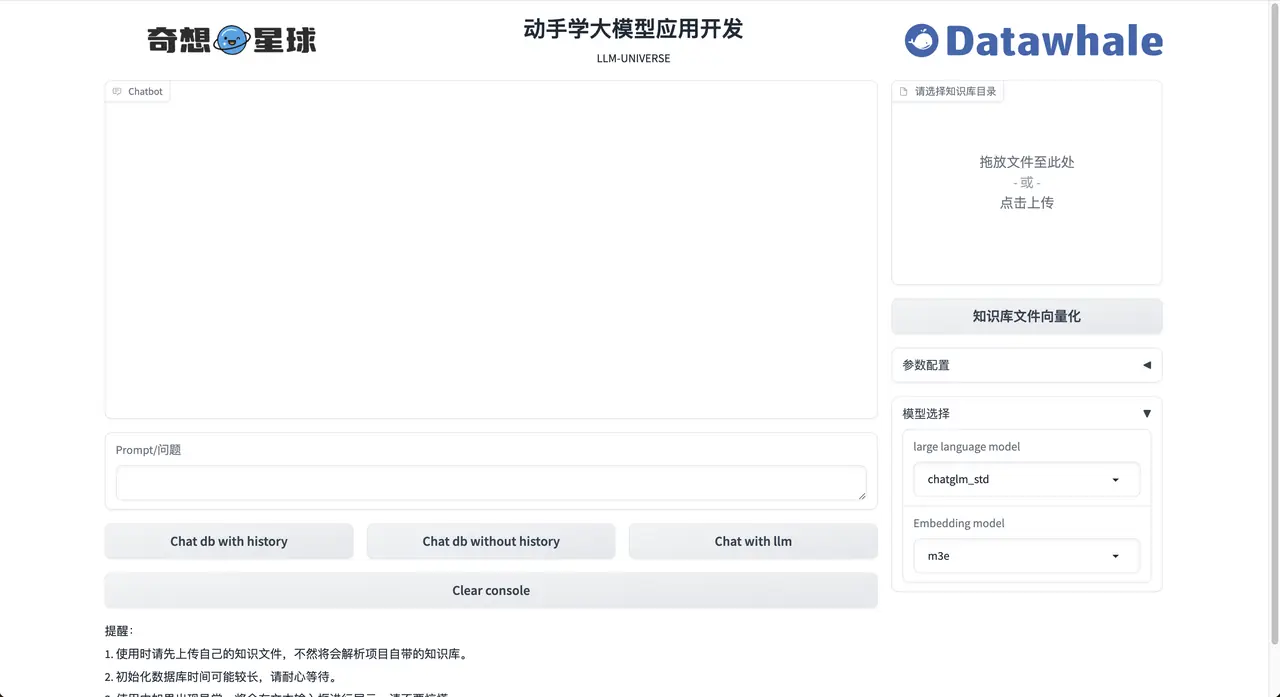
Project start interface
Question and Answer Demonstration Interface
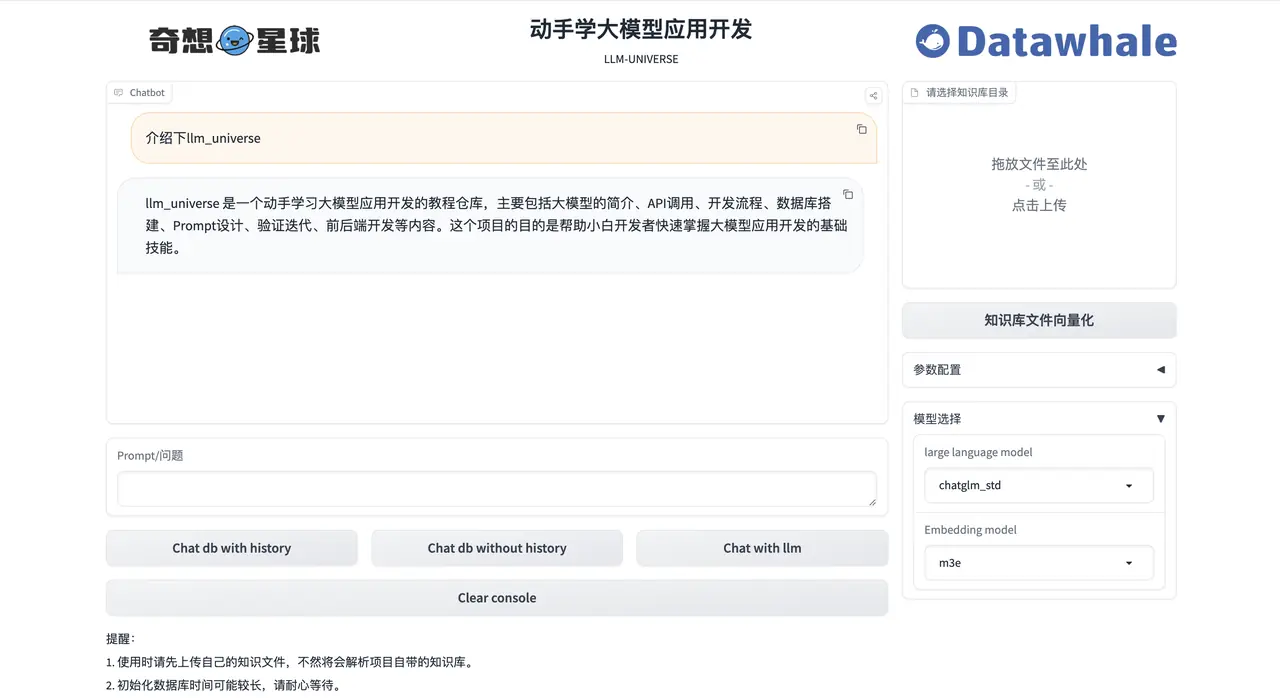
Example demonstration interface
- Introduction to joyrl demo
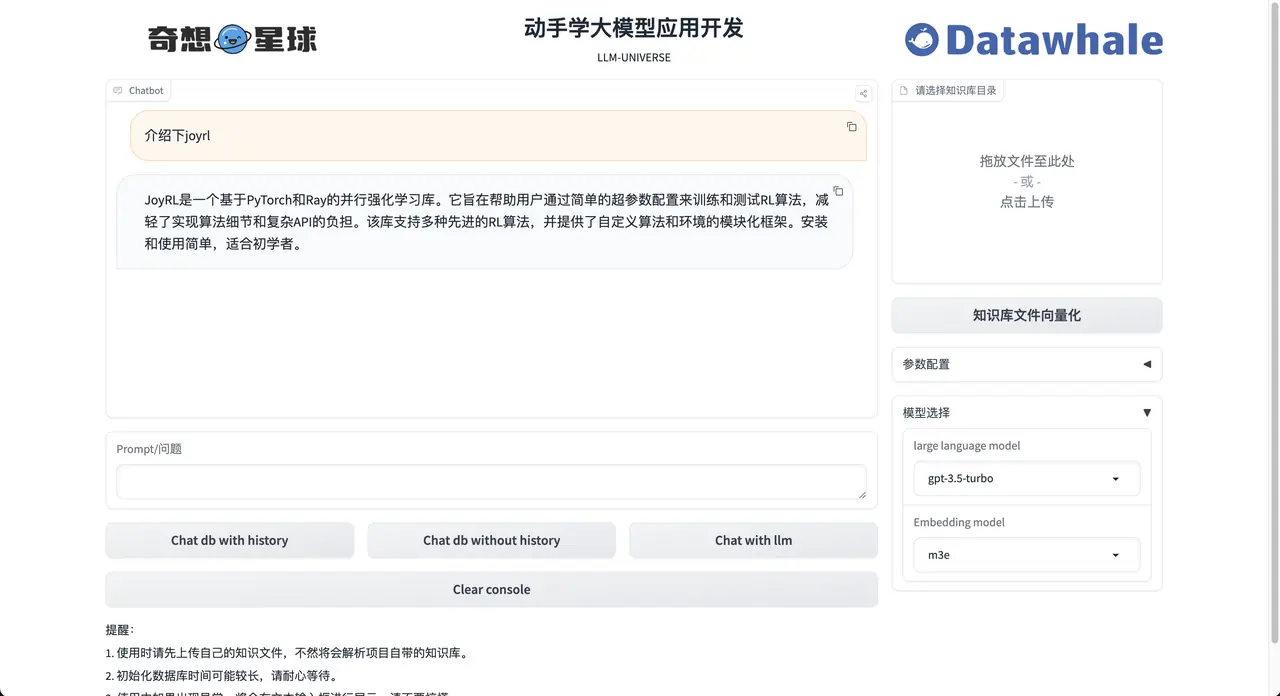
- Demonstration of the relationship between joyrl-book and joyrl
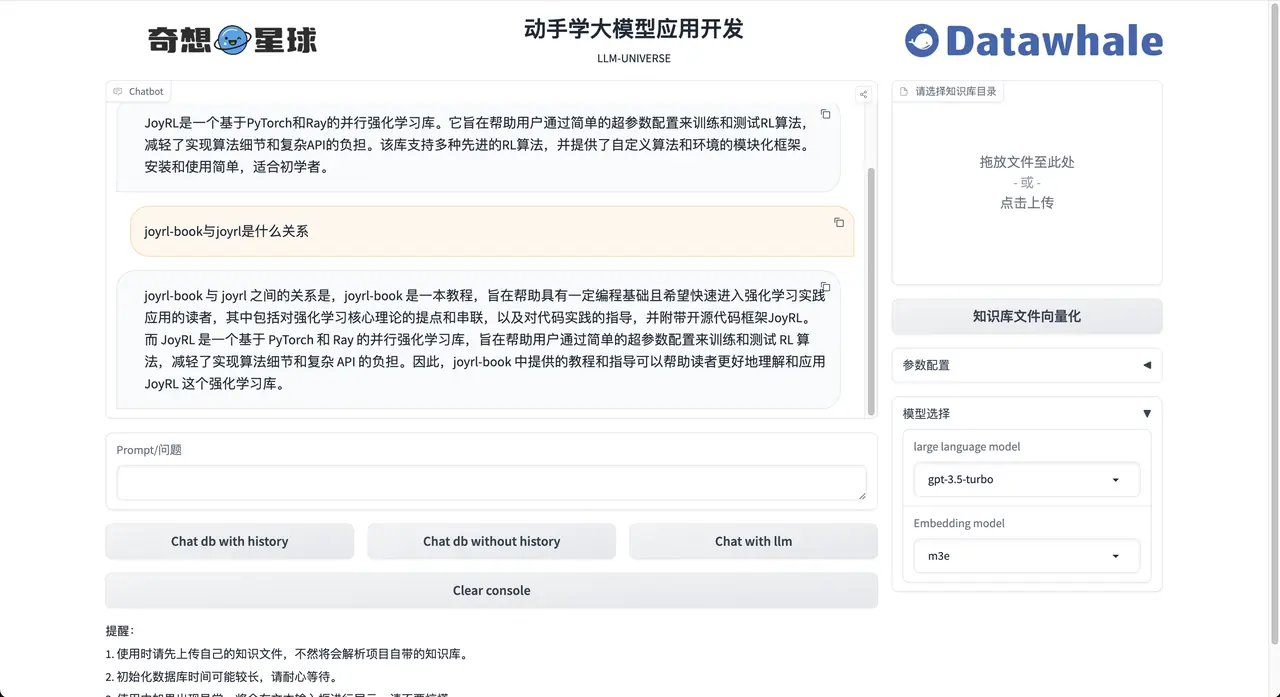
2. Technical implementation
1. Environmental dependence
1.1 Technical resource requirements
-
CPU: Intel 5th generation processor (for cloud CPU, it is recommended to choose a cloud CPU service with more than 2 cores)
-
Memory (RAM): At least 4 GB
-
Operating system: Windows, macOS, Linux are all available
1.2 Project settings
Clone repository
Create Conda environment and install dependencies
- python>=3.9
- pytorch>=2.0.0
1.3 Project operation
- Start the service as a local API
- Run the project
2. Brief description of development process
2.1 Current project version and future plans
-
Current version: 0.2.0 (updated on 2024.3.17)
-
UPDATE CONTENT
-
[√] Added m3e embedding
-
[√] Added new knowledge base content
-
[√] Added summary of all MDs of Datawhale
-
[√] Fix grdio display error
-
Currently supported models
- OpenAi
- [√] gpt-3.5-turbo
- [√] gpt-3.5-turbo-16k-0613
- [√] gpt-3.5-turbo-0613
- [√] gpt-4
- [√] gpt-4-32k
- OpenAi
-
A word from Wen Xin - [√] ERNIE-Bot - [√] ERNIE-Bot-4 - [√] ERNIE-Bot-turbo
-
iFlytek Spark - [√] Spark-1.5 - [√] Spark-2.0
-
Wisdom AI - [√] chatglm_pro - [√] chatglm_std - [√] chatglm_lite
-
Future Planning
-
Update Ai embedding
2.2 Core Idea
The core is to implement the underlying encapsulation for four large model APIs, build a switchable model retrieval and question chain based on Langchain, and implement the API and personal lightweight large model applications deployed by Gradio.
2.3 Technology stack used
This project is a personal knowledge base assistant based on a large model, built on the LangChain framework. The core technologies include LLM API calls, vector databases, search question and answer chains, etc. The overall structure of the project is as follows:
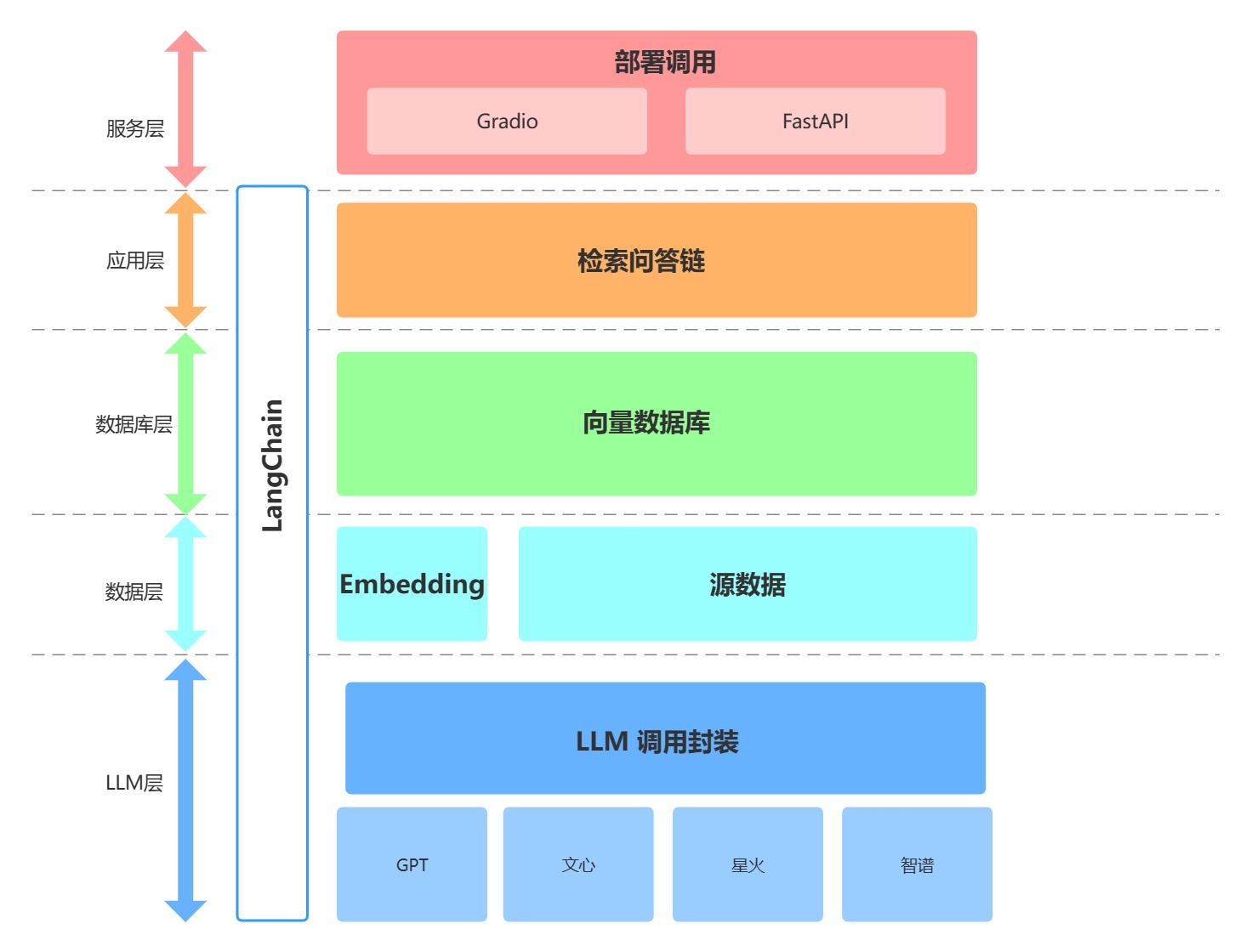
As above, this project is divided into LLM layer, data layer, database layer, application layer and service layer from bottom to top.
① The LLM layer mainly encapsulates LLM calls based on four popular LLM APIs, allowing users to access different models through a unified entrance and method, and supporting model switching at any time;
② The data layer mainly includes the source data of the personal knowledge base and the Embedding API. The source data can be used by the vector database after Embedding processing;
③ The database layer is mainly a vector database built based on the source data of the personal knowledge base. In this project, we chose Chroma;
④ The application layer is the top-level encapsulation of the core functions. We further encapsulate it based on the retrieval question and answer chain base class provided by LangChain, thereby supporting different model switching and convenient implementation of database-based retrieval and question answering;
⑤ The top layer is the service layer. We have implemented two methods: Gradio to build Demo and FastAPI to build API to support service access of this project.
3. Application details
1. Core architecture
llm-universe personal knowledge base assistant address:
https://github.com/datawhalechina/llm-universe/tree/main
This project is a typical RAG project. It uses langchain+LLM to realize local knowledge base question and answer, and establishes a local knowledge base dialogue application that can be implemented using open source models throughout the process. Currently, it supports access to ChatGPT, spark model, Wenxin large model, GLM and other large language models. The implementation principle of this project is the same as that of the general RAG project, as shown in the previous article and the figure below:
The entire RAG process includes the following operations:
-
Users ask questions Query
-
Load and read knowledge base documents
-
Segment the knowledge base documents
-
Vectorize the segmented knowledge base text and store it in the vector base to create an index.
-
Query vectorization
-
Match the top k most similar to the question Query vector in the knowledge base document vector.
-
The matched knowledge base text is added to the prompt together with the question as context.
-
Submit to LLM to generate answer Answer
It can be roughly divided into three stages: indexing, retrieval and generation. These three stages will be dismantled in the following sections in conjunction with the llm-universe knowledge base assistant project.
2. Index-indexing
This section describes the project llm-universe personal knowledge base assistant: creating a knowledge base and loading files - reading files - Text splitter (Text splitter), knowledge base Text vectorization (embedding) and the implementation of storing to vector database,
Among them Load file: This is the step to read the knowledge base file stored locally. Read file: Read the contents of the loaded file, usually converting it into text format. Text splitter: Split text according to certain rules (such as paragraphs, sentences, words, etc.). Text vectorization: This usually involves NLP feature extraction. This project uses local m3e text embedding model, openai, zhipuai open source api and other methods to convert the segmented text into numerical vectors and store them in the vector database
2.1 Knowledge base construction-loading and reading
The project llm-universe personal knowledge base assistant uses some classic open source courses and videos (parts) of Datawhale as examples, including:
- 《机器学习公式详解》PDF版本
- 《面向开发者的 LLM 入门教程 第一部分 Prompt Engineering》md版本
- 《强化学习入门指南》MP4版本
- and the readme https://github.com/datawhalechina of all open source projects in the datawhale general warehouse
These knowledge base source data are placed in the ../../data_base/knowledge_db directory. Users can also store their own other files.
1. Let’s talk about how to obtain the readme of all open source projects in the DataWhale general warehouse. Users can first run the project/database/test_get_all_repo.py file to obtain the readme of all open source projects in the DataWhale general warehouse. The code is as follows:
By default, these readme files will be placed in the readme_db file in the same directory as database. These readme files contain a lot of irrelevant information, that is, running the project/database/text_summary_readme.py file can call the large model to generate a summary of each readme file and save it to the above knowledge base directory ../../data_base/knowledge_db /readme_summary folder, ****. The code is as follows:
Among them, the extract_text_from_md() function is used to extract the text in the md file, and the remove_urls() function filters out some web links in the readme text and filters out some words that may cause risk control for large models. Then call generate_llm_summary() to let the large model generate a summary of each readme.
2. After the above knowledge base is constructed, the ../../data_base/knowledge_db directory will have the md files summarized by the readme of all open source projects of Datawhale, as well as 《机器学习公式详解》PDF版本, 《面向开发者的 LLM 入门教程 第一部分 Prompt Engineering》md版本, 《强化学习入门指南》MP4版本 and other files.
There are mp4 format, md format, and pdf format. For the loading method of these files, the project places the code under the project/database/create_db.py file. Part of the code is as follows. Among them, the pdf format file uses the PyMuPDFLoader loader, and the md format file uses the UnstructuredMarkdownLoader loader. It should be noted that data processing is actually a very complex and business-specific matter. For example, a PDF file contains charts, pictures, text, and titles at different levels, which require refined processing according to the business. For specific operations, you can pay attention to the second part of the advanced RAG tutorial technology to explore on your own:
2.2 Text segmentation and vectorization
Text segmentation and vectorization operations are essential in the entire RAG process. The above-loaded knowledge base needs to be divided into copies or divided by token length, or divided by semantic model. This project utilizes the text splitter in Langchain to split based on chunk_size (chunk size) and chunk_overlap (overlap size between chunks).
- chunk_size refers to the number of characters or Tokens (such as words, sentences, etc.) contained in each chunk
- chunk_overlap refers to the number of characters shared between two chunks, which is used to maintain the coherence of the context and avoid losing context information during segmentation
1. You can set a maximum Token length, and then split the document according to this maximum Token length. The document fragments segmented in this way are document fragments of uniform length. Some overlapping content between fragments can ensure that relevant document fragments can be retrieved during retrieval. This part of the text splitting code is also in the project/database/create_db.py file. The project uses the RecursiveCharacterTextSplitter text splitter in langchain for splitting. The code is as follows:
2. After segmenting the knowledge base text, the text needs to be vectorized. The project is in project/embedding/call_embedding.py. The text embedding method can choose the local m3e model, and the method of calling the api of openai and zhipuai for text embedding. The code is as follows:
2.3 Vector database
After segmenting and vectorizing the knowledge base text, you need to define a vector database to store document fragments and corresponding vector representations. In the vector database, data is represented in vector form, and each vector represents a data item. These vectors can be numbers, text, images, or other types of data.
Vector databases use efficient indexing and query algorithms to speed up the storage and retrieval process of vector data. This project chooses the chromadb vector database (similar vector databases include faiss, etc.). The code corresponding to the definition of the vector library is also in the project/database/create_db.py file. persist_directory is the local persistence address. The vectordb.persist() operation can persist the vector database locally, and the existing local vector library can be loaded again later. Complete text segmentation, obtain vectorization, and define the vector database code as follows:
3. Retrieve-Retriver and Generate-Generator
This section enters the retrieval and generation stage of RAG, that is, after vectorizing the question Query, the top k fragments most similar to the question Query vector are matched in the knowledge base document vector. The matched knowledge base text is added to the prompt as the context and question, and then submitted to LLM to generate the answer. The following will be explained based on the llm_universe personal knowledge base assistant.
3.1 Vector database retrieval
By segmenting and vectorizing the text in the previous chapter and building a vector database index, the vector database can be used for efficient retrieval. Vector database is a library for efficiently searching for similarities in large-scale high-dimensional vector spaces, which can quickly find the most similar vector to a given query vector in large-scale data sets. As shown in the following example:
3.2 Calling large model llm
Here we take the project/qa_chain/model_to_llm.py code of this project as an example. The packages for open source model API calls such as *** Spark***, Glm, Wenxin llm are defined under the directory folder of project/llm/. These modules are imported in the project/qa_chain/model_to_llm.py file, and llm can be called according to the model name passed in by the user. The code is as follows:
3.3 prompt and build question and answer chain
Next comes the last step. After designing the prompt based on the knowledge base Q&A, the answer can be generated by combining the above retrieval and large model call. The format of building prompt is as follows, which can be modified according to your business needs:
And build a question and answer chain: The method to create a retrieval QA chain, RetrievalQA.from_chain_type(), has the following parameters:
- llm: Specify the LLM used
- Specify chain type: RetrievalQA.from_chain_type(chain_type="map_reduce"), you can also use the load_qa_chain() method to specify the chain type.
- Custom prompt: By specifying the chain_type_kwargs parameter in the RetrievalQA.from_chain_type() method, and this parameter: chain_type_kwargs = {"prompt": PROMPT}
- Return the source document: Specify the return_source_documents=True parameter in the RetrievalQA.from_chain_type() method; you can also use the RetrievalQAWithSourceChain() method to return the reference of the source document (coordinates or primary key, index)
The effect of the question and answer chain is as follows: prompt effect built based on the combination of recall results and query
The above detailed retrieval question and answer chain codes without memory are all in the project: project/qa_chain/QA_chain_self.py. In addition, the project also implements the retrieval question and answer chain with memory. The internal implementation details of the two custom retrieval question and answer chains are similar, but different LangChain chains are called. The complete retrieval question and answer chain code with memory project/qa_chain/Chat_QA_chain_self.py is as follows:
3. Summary and outlook
3.1 Summary of key points of personal knowledge base
This example is a personal knowledge base assistant project based on a large language model (LLM), which helps users quickly locate and obtain knowledge related to DATa whales through intelligent retrieval and question and answer systems. Here are the key points of the project:
Key point one
-
The project uses multiple methods to complete the extraction and summary of all md files in Datawhale and generate the corresponding knowledge base. While completing the extraction and summary of md files, corresponding methods are also used to complete the filtering of web links in the readme text and vocabulary that may cause risk control of large models;
-
The project uses the text cutter in Langchain to complete text segmentation before the vectorization operation of the knowledge base. The vector database uses efficient indexing and query algorithms to accelerate the storage and retrieval process of vector data, and quickly complete the establishment and use of personal knowledge base data.
Key point two
The project provides low-level encapsulation of different APIs. Users can avoid complex encapsulation details and directly call the corresponding large language model.
3.2 Future development direction
-
User experience upgrade: Support users to upload and establish personal knowledge base independently, and build their own exclusive personal knowledge base assistant;
-
Model architecture upgrade: from the universal architecture of REG to the multi-agent framework of Multi-Agent;
-
Function optimization and upgrade: Optimize the retrieval function within the existing structure to improve the retrieval accuracy of the personal knowledge base.
4. Acknowledgments
I would like to thank Master San for his 项目 crawler and summary part.