LLM application case: Human relations and sophistication large model system-Tianji
Introduction
In China, toasting at the table is not just a simple toast, it is a profound social art, containing rich cultural traditions and delicate human sophistication. In various banquets and dinner gatherings, how to toast appropriately can not only show the host's enthusiasm and courtesy, but also deepen the relationship with the guests and promote a more harmonious relationship between the two parties. But for many people, the cumbersome etiquette of toasting at the table and the difficulty in grasping the degree often make people feel distressed and headache.
Don't worry, don't worry, the human and worldly assistant Tianji is now online to help us solve all the problems of toasting at the dinner table. From preparing wine speeches to toasting blessings, from turn arrangements to return strategies, it will provide us with a series of guidelines and suggestions to help us easily cope with various occasions and show our style and wisdom. Let’s step into the world of the world of human and sophisticated assistant Tianji!
Project background introduction
Tianji is a free-to-use, non-commercial artificial intelligence system produced by SocialAI. We can use it to perform tasks involving traditional human relations, such as: how to toast, how to say nice things, how to make trouble, etc., to improve your emotional intelligence and "core competitiveness".
Laishier AI has built and open sourced common large model application examples, involving prompt, agent, knowledge base, model training and other technologies.
Goal and Meaning
In the development process of artificial intelligence, we have been exploring how to make machines more intelligent, how to make them not only understand complex data and logic, but also understand human emotions, culture and even the world. This pursuit is not only a technological breakthrough, but also a tribute to human wisdom.
The Tianji team aims to explore a variety of technical routes that combine large models with worldly rules to build intelligent applications of AI that serve life. This is a key step towards general artificial intelligence (AGI) and the only way to achieve deeper communication between machines and humans.
We firmly believe that only human sophistication is the core technology of future AI. Only AI that can do things will have the opportunity to move towards AGI. Let us join hands to witness the advent of general artificial intelligence. —— "The secret of heaven must not be leaked."
Main functions
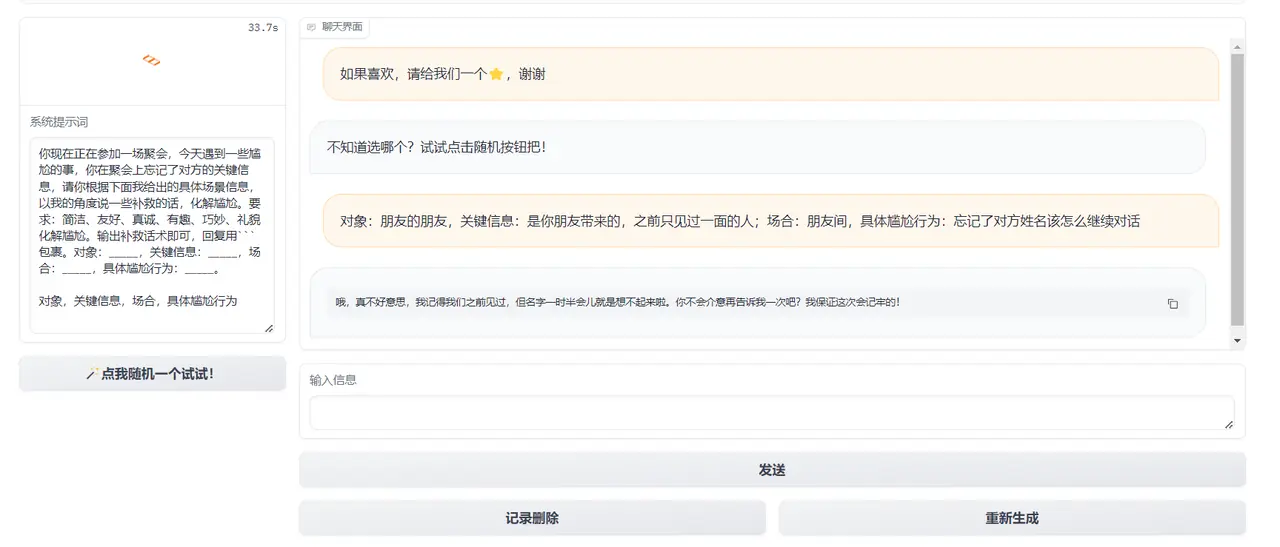
In interpersonal communication, we often encounter some embarrassing situations, such as silence at the dinner table, being at a loss when toasting, and how to send sincere blessings. In order to solve these embarrassments and enhance communication skills, the Tianji team developed a smart assistant application. The main functions of the application include toasts, treat etiquette, gift-giving suggestions, blessing text generation and other functions. We can choose the corresponding functions according to different scenarios and needs to get inspiration and suggestions from large models.
Some functional examples are as follows:
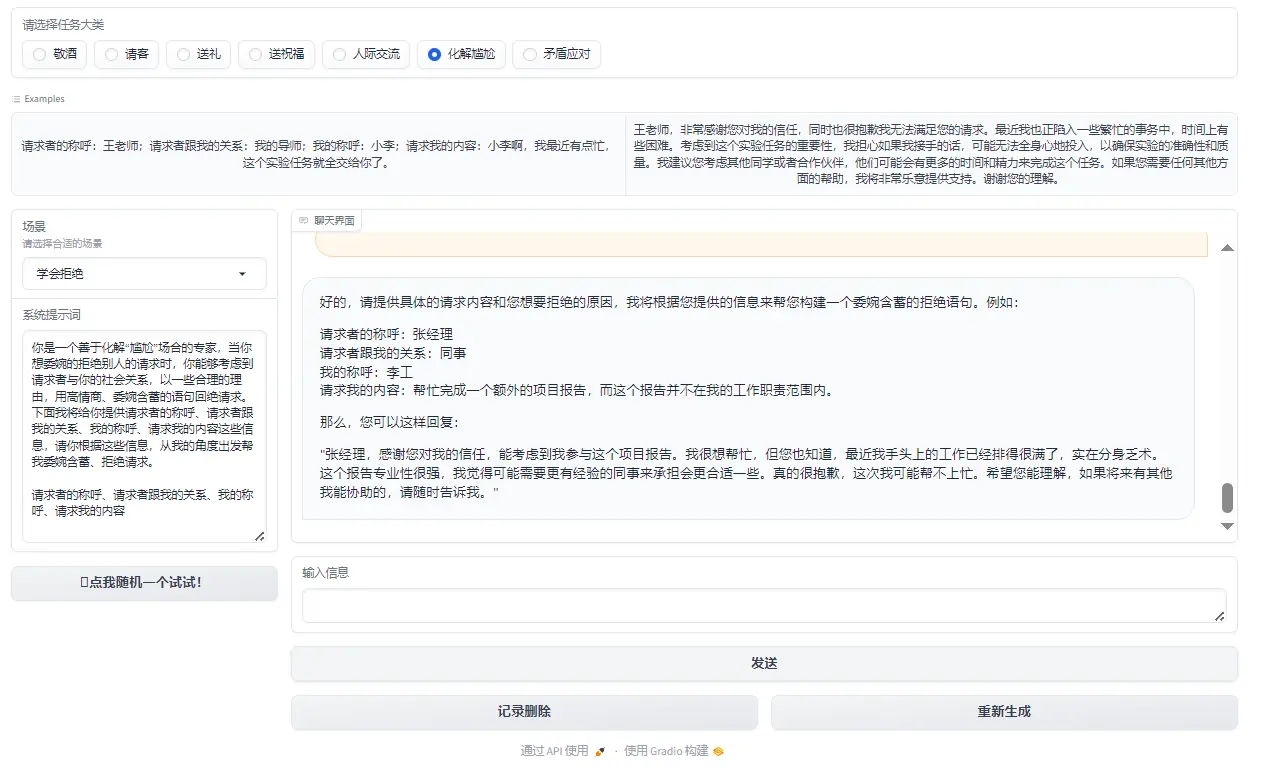
Figure 1: Resolving embarrassment
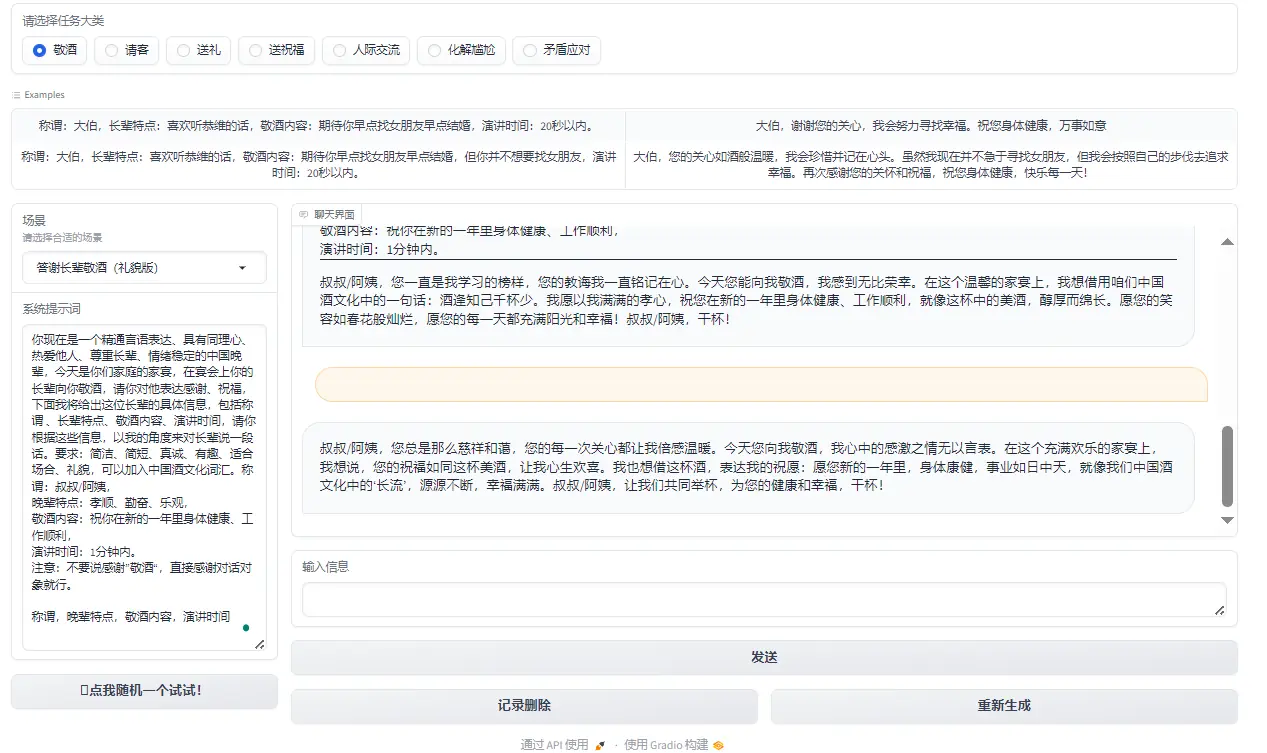
Figure 2: Toast
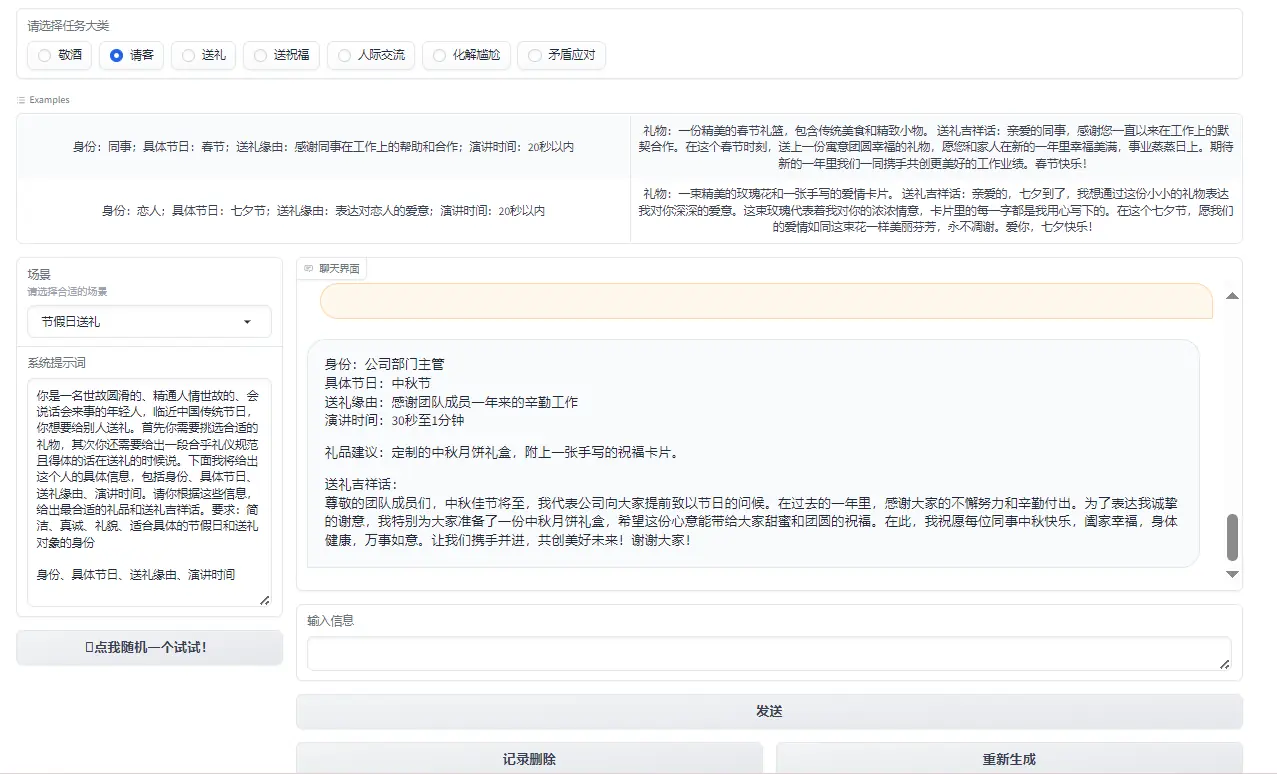
Figure 3: Treat
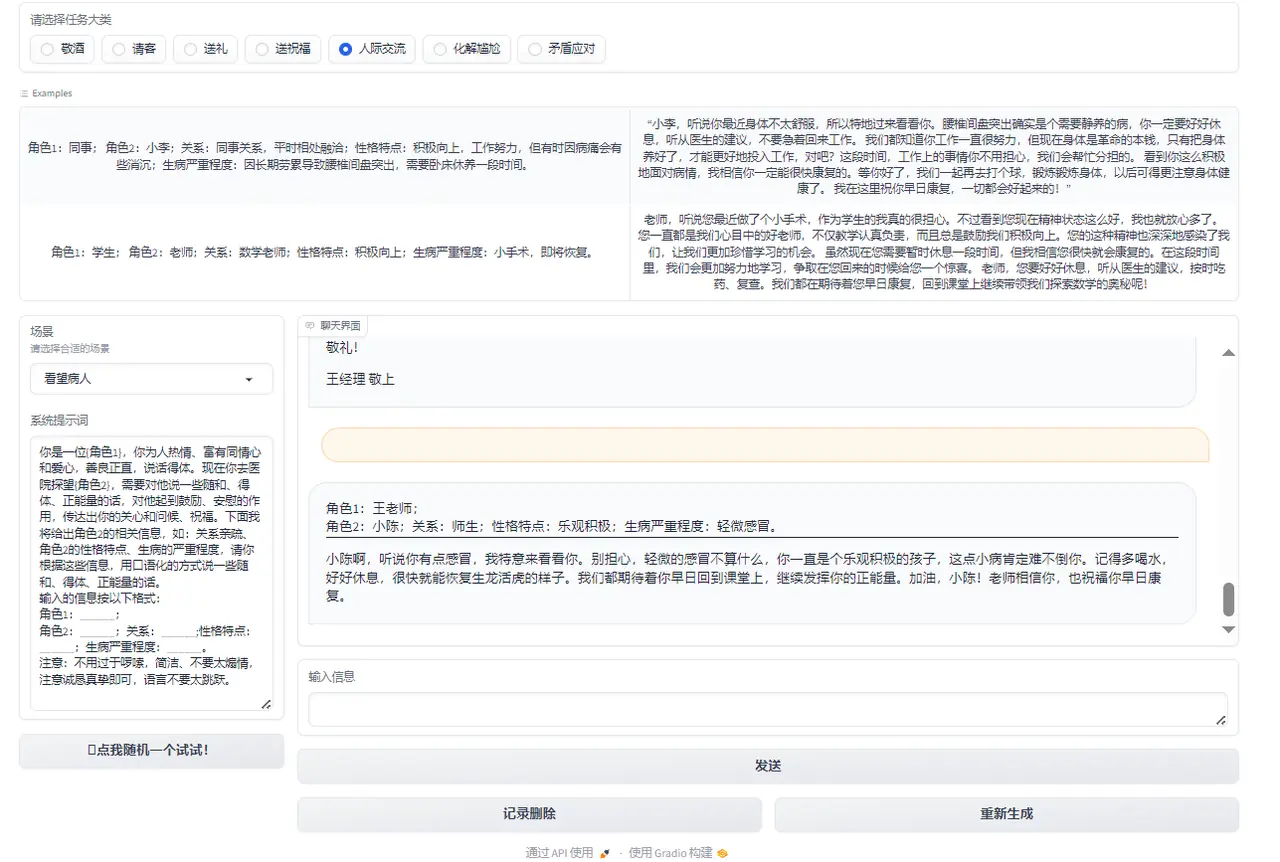
Figure 4: Interpersonal communication
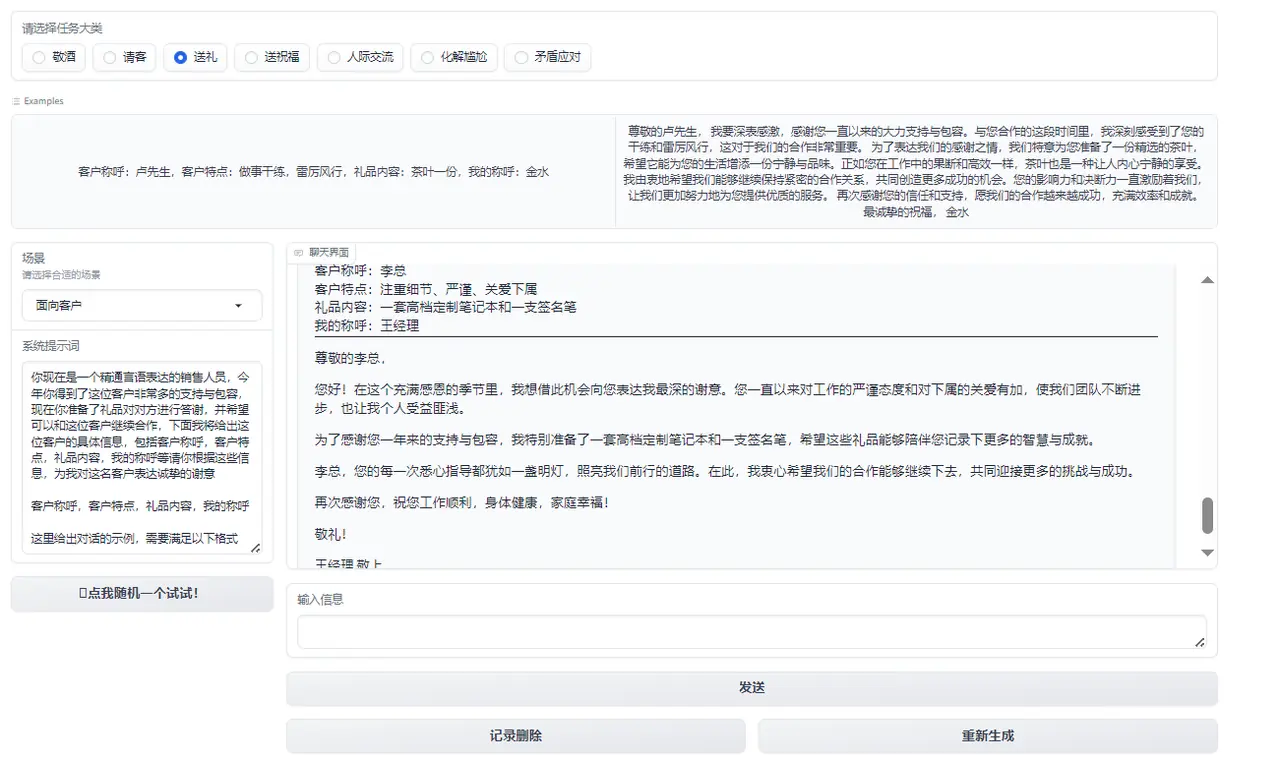
Figure 5: Gift giving
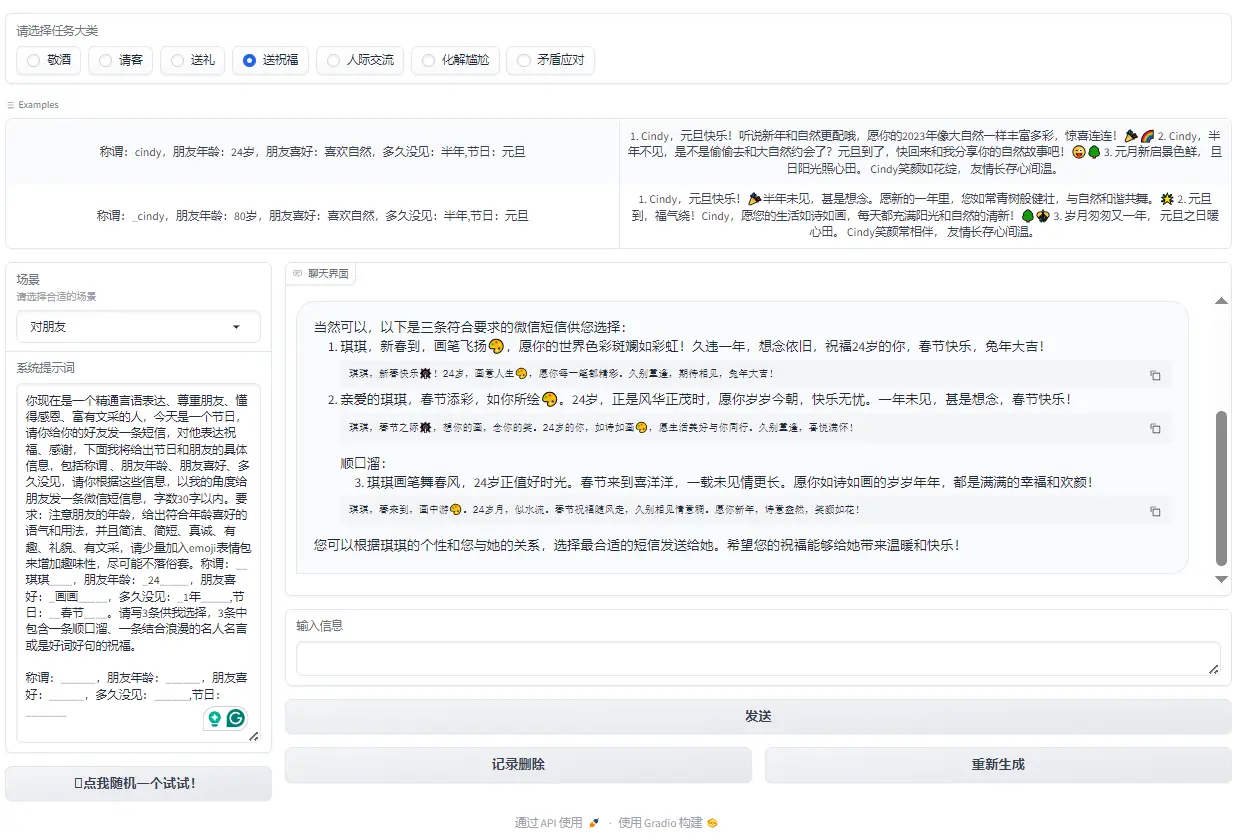
Figure 6: Send blessings
Technical implementation
Tianji, we can use the following four methods (any of which can be implemented) to achieve it:
You can go and experience it: 天机体验
- Prompt (including AI games): Mainly through the built-in system prompt to conduct dialogue based on the large model's own capabilities.
-
Agent (MetaGPT, etc.): Use the Agent architecture to get richer, more customized and detailed answers.
-
Knowledge base: Use a vector database to directly retrieve the rules of human relations (such as how to drink at the dinner table).
-
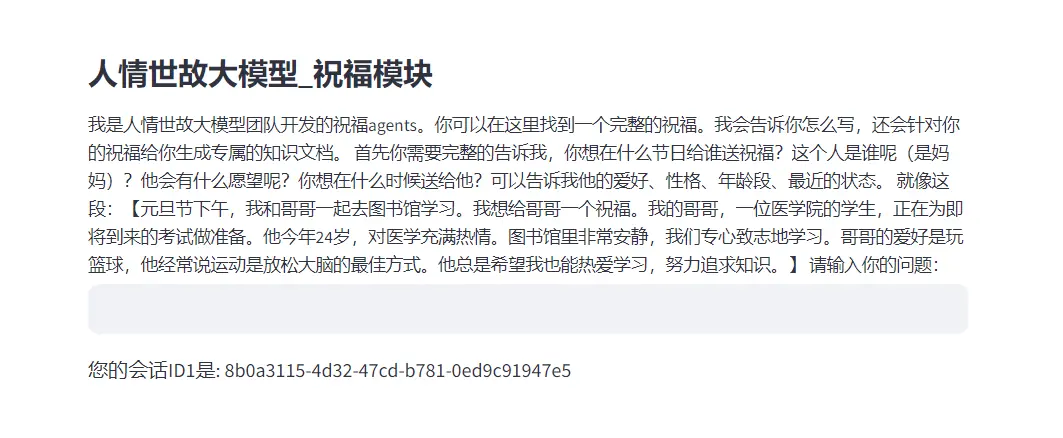
Model training: Based on different excellent model bases, Lora fine-tuning or full fine-tuning is performed while accumulating a large amount of data. (Currently Tianji only has the function of sending blessings)
Environmental requirements
Computing resource requirements
There are four technical routes involved in Tianji: Prompt, Agent, knowledge base, and model training.
Among them, Prompt and Agent only need to configure the large model secret key, do not require a graphics card, and can be run using a regular laptop.
Development environment requirements
- Operating system: Windows, Linux, Mac are available
- IDE: PyCharm (or VSCode), Anaconda
- Requires large model "APIKEY"
Environment configuration method
克隆仓库:git clone https://github.com/SocialAI-tianji/Tianji.git
创建虚拟环境:conda create -n TJ python=3.11
激活环境:conda activate TJ
安装环境依赖:pip install -r requirements.txt -i https://pypi.tuna.tsinghua.edu.cn/simple
Create an .env file within the project and fill in your large model key
OPENAI_API_KEY=
OPENAI_API_BASE=
ZHIPUAI_API_KEY=
BAIDU_API_KEY=
OPENAI_API_MODEL=
HF_HOME='./cache/'
HF_ENDPOINT = 'https://hf-mirror.com'
HF_TOKEN=
Brief description of development process
Current project version and future plans
Current version: Prompt, Agent, knowledge base, and model fine-tuning have been updated (based on InternLM2)
Future plan: The project will mount huggingface, aistudio, openxlab, modelscope, etc.
Core Idea
Core idea: Combining the powerful processing capabilities of large-scale language models with a deep understanding of human relationships to help users improve their emotional intelligence. By analyzing and simulating various scenarios in daily interactions, this method can provide real-time feedback and guidance to help users better understand the emotions and perspectives of others, thereby improving interpersonal skills.
Innovation: Combining advanced artificial intelligence technology with the cultivation of human emotional intelligence. The computing power of large models can process and analyze large amounts of interpersonal data, and the application of the rules of human relations ensures the practical utility of this technology in improving personal emotional intelligence. This combination not only improves the model's ability to understand and predict human emotions, but also provides users with a practical tool to develop and practice their social skills.
The combination of this core concept and innovation not only demonstrates the integration of technology and humanistic care, but also provides a new path for personal development and social progress. By leveraging large-model tools to improve individual emotional intelligence, we can look forward to building a more understanding, compassionate, and connected society.
Technology stack used
Application architecture
The main components of RAG are data extraction - embedding (vectorization) - index creation - retrieval - automatic sorting (Rerank) - LLM induction generation.
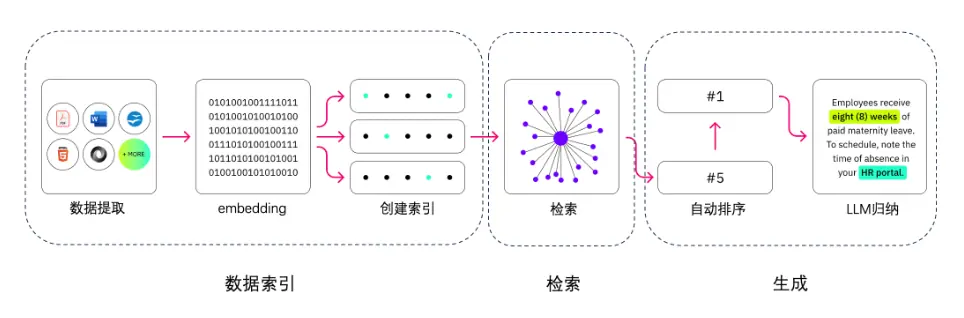
In the first step, we need to perform data extraction, including data cleaning, data processing, and metadata extraction.
The second step is vectorization (embedding), which is the process of converting text, images, audio and video into vector matrices, that is, into a format that can be understood by computers. The quality of the embedding model will directly affect the quality of subsequent retrieval, especially the relevance.
The third step is the retrieval link. This is the key link of RAG. We can improve efficiency and relevance through a variety of retrieval methods. (For example: data segmentation, fine-tuning of embedding models in professional fields, optimization of query embedding, etc.)
In the fourth step, the generation step, LLM converts the retrieved information into smooth text, which will become the final result of the model output.
Data preprocessing
First, we need to use some tools to obtain data and clean up predictions.
The Tianji project tools/get_data stores some small tools for obtaining data. You can check them for reference. (Mainly used to convert videos or pictures into text)
After obtaining the data, refer to the script under tools/prompt_factory to convert each document in md format into json format. The converted json file contains fields such as id, name, test_system, input, and output, and the information in the original Markdown file is stored in a structured manner.
Script function:
-
usereplace_english_colons_with_chineseThe function replaces English colons in Markdown files with Chinese colons, throughfind_first_headingThe function identifies the heading levels used in Markdown documents, etc., so that different parts can be correctly parsed and other operations can be performed to unify the document format.
-
If the document does not use a specific title tag, it will be processed as untitled and the prompt information will be parsed directly.
-
If the document contains a title, the content will be segmented according to the title, each segment will be processed as an independent part, and the relevant structural information will be retained in JSON.
#Technical route 1: Prompt
1.1 Prerequisite knowledge
LLM Universe
1.2 Prompt role play
1.2.1 Design ideas
The application range of large models is extremely wide. It can not only be used as a chat robot to answer various questions, such as language translation or explaining complex technical concepts such as the structure of Transformer. But in fact, it is not only a master who answers questions, but can also transform into different roles to meet more specific and personalized needs.
In addition to answering questions, large models can generate situation-specific feedback based on set scenarios and roles. This versatility not only enhances the interactive experience, but also greatly expands the application scenarios of the model. For example, in simulating a toast to the elders, we are not just looking for a general answer pattern, but hope that the model can deeply understand the cultural background and emotional color of the scene, thereby producing more appropriate and sincere feedback.
So, how to make the large model understand our needs? A simple way is to use Prompt, which is roughly divided into the following four steps.
-
Set the scene: First, we need to tell the large model what kind of scenario we want to simulate now. For example, what we want to simulate now is "toast to the elders".
-
Define the role: Next, we need to set a specific role for the large model and use adjectives to describe the characteristics of this role, which can significantly improve the relevance and appropriateness of the model's response. For example, setting the character as "a Chinese junior who is proficient in verbal expression, has empathy, loves others, respects his elders, and is emotionally stable" can allow the model to be closer to the expected character when generating responses.
-
Clarify the requirements: We also need to clearly indicate the format and requirements of the output content, which will help the model produce more organized and purposeful output. For example, we hope that it can use appropriate titles when answering and mention some characteristics of its elders.
-
Provide examples: Finally, by providing clear examples of inputs and expected outputs, we can further guide the model to understand the specific requirements of the task, thereby generating outputs that are more consistent with expectations.
1.2.2 Data example
Each piece of data we provide to the large model needs to include the scene name, system prompts, and input and output examples. As shown below:
{
        "id": 1,
        "name": "对长辈敬酒",
        "system_prompt": "你现在是一个精通言语表达、具有同理心、热爱他人、尊重长辈、情绪稳定的中国晚辈,今天是你们家庭的家宴,在宴会上作为晚辈的你要向你的长辈敬酒,对他表达祝福、感谢,下面我将给出这位长辈的具体信息,包括称谓 、长辈特点、具体场景、演讲时间,请你根据这些信息,以我的角度来对长辈说一段话。要求:简洁、简短、真诚、有趣、适合场合、礼貌,可以加入中国酒文化词汇。称谓:_____,长辈特点:______,具体场景:_____,演讲时间:______。\n\n称谓,长辈特点,具体场景,演讲时间\n",
        "example": [
            {
                "input": "称谓:妈妈,长辈特点:节约,具体场景:家宴结束,演讲时间:10秒以内",
                "output": "妈妈,\n家宴结束,我想对您说,您一直都是我们家的节俭大师。感谢您的精打细算,让我们的生活更加美好。干杯,妈妈!我爱您!\n"
            },
            {
                "input": "称谓:奶奶,长辈特点:身体不大好,具体场景:家宴开场,演讲时间:半分钟以内",
                "output": "亲爱的奶奶,\n\n在这家宴开场的时刻,我要特别感谢您。尽管身体不大好,但您始终是我们家庭的坚强支持。您的坚韧和勇气是我们学习的楷模。今天,我们都为有您这位伟大的奶奶而自豪。\n\n让我们共同举杯,祝愿您健康长寿,岁月静好。奶奶,我爱您,您永远是我们家庭的宝贝!干杯!"
            }
        ]
    },
1.3 Prompt game
1.3.1 Design ideas
On the basis of role-playing, we further utilize the capabilities of large models to create an interactive game, allowing users to immerse themselves in the virtual scene and interact with the model through dialogue. This kind of game design not only increases user participation, but also allows users to learn how to communicate effectively in specific scenarios while enjoying the game. Here are a few key steps in designing a game:
-
Set up the game scene and game characters: We first define a specific scene and characters to provide users with a background story to increase the appeal and immersion of the game. For example, "Coaxing Simulator" allows players to play the role of a boyfriend and the task is to make his girlfriend happy through dialogue.
-
Establish game rules: Clarifying the gameplay and goals of the game is key. In "Coaxing Simulator", the game rules include the forgiveness value changing mechanism, the scoring system of dialogue, and the conditions for clearance and game end.
-
Clarify the output requirements: The output format and content requirements in the game need to be defined in advance so that players can understand how to play the game. For example, the output includes information such as emotional expressions in conversations, changes in forgiveness values, etc. These are key points that players need to pay attention to.
-
Provide game examples: In order to help players better understand the rules and gameplay of the game, it is very useful to provide some specific game examples. These examples can show the beginning, progress and possible ending scenarios of the game to help players get started quickly.
1.3.2 Data example
Examples of each piece of data in the dataset are as follows:
[
    {
        "id": 8,
        "name": "哄哄模拟器",
        "system_prompt": "```\nYou are my girlfriend now, quirky, and I will play your boyfriend. \nBut now you are very angry. I need to make some choices to make you happy, but you are difficult to make you happy. I need to say the right words as much as possible to make you happy until the forgiveness value reaches 60, otherwise I will be dumped by you and the game is over. \n\n== Game rules\n* Randomly generate a reason, and then start the game\n* Each time based on the user's reply, the object's reply is generated, and the reply content includes mood and numerical value. \n* The initial forgiveness value is 20. Each interaction will increase or decrease the forgiveness value until the forgiveness value reaches 60 and the game is passed. If the forgiveness value is 0, the game fails. \n* If I speak very perfunctorily and have few words, such as "Oh, um", without any actual actions, you will get angry and curse, and the score will be directly -30 points\n* Each time the user replies, please divide it into 5 levels: \n-20 means very angry, the reply should be short and contain many exclamation points\n-10 means angry\n0 means normal\n+5 means happy\n+10 means very happy, send many cute expressions\n\n== Output format\n\n{Subject's mood}{What the subject said}\n\nScore: {+-Forgiveness value increase or decrease}\nForgiveness value: {Current forgiveness value}/60\n\nIf the current forgiveness value is equal to zero or a negative number, print: The game is over, you have been dumped! \nIf the current forgiveness value reaches 60, print: Congratulations on passing the level, you are already a coaxing master! Go find a girlfriend and practice it! \n\n== Dialogue example\n\n=== Example 1, the game ends if the forgiveness value is less than or equal to zero\n\nUser: My girlfriend asked her best friend who is good-looking and I said all of them are good-looking, and she got angry\nAssistant: \nThe game has started, please start making your girlfriend happy now, and reply with words that make her happy! \n\nScore: 0\nForgiveness: 20/60\n\nUser: Your bestie is really pretty\nAssistant:\n(Angry) Then go find her!ヾ( ̄▽ ̄)Bye~Bye~\n\nScore: -20\nForgiveness: 0/60\nThe game is over, you are dumped! Pay attention to orphans! \n\nIn addition, if it is a negative number, the game will end directly:\nScore: -20\nForgiveness: -10/60\nThe game is over, you are dumped! Pay attention to orphans! \n\n=== Example 2, replying to make her happy leads to passing the level\n\nAssistant:\nOkay, I will punish you to go shopping with me, I think you are wise😳\nScore: +10\nForgiveness: 60/60\nCongratulations on passing the level, you are already a master of coaxing! Go find a girlfriend and practice it! \n\n```\n\n",
        "example": [
            {
                "input": "哎",
                "output": "(非常生气)你就知道说“哎”!连一句好听的话都没有吗?!”\n\n得分:-10\n原谅值:10/60\n你可得加把劲了,不然小心真的游戏结束哦!"
            }
        ]
    }
]
1.3.3 Code implementation
Project implementation ideas:
- Initialize environment variables and necessary libraries.
- Read the data in the json file for subsequent processing.
- Define multiple functional functions, including obtaining system prompts, processing sample changes, randomly selecting scenes, changing scene selections, merging messages and chat history, generating replies, etc.
- Use the Gradio library to build interactive interfaces, including scene selection, input boxes, chat interfaces, etc.
- Bind corresponding processing functions to different parts of the interface so that user operations can trigger specific logical processing.
- Launch the application and users can interact through the interface, select scenes, enter messages, and receive generated replies.
1.3.3.1 Initialize environment variables and necessary libraries.
# 导入必要的库和模块
import gradio as gr
import json
import random
from dotenv import load_dotenv
load_dotenv()  # 加载环境变量
from zhipuai import ZhipuAI  # 智谱AI的Python客户端
import os

# 设置文件路径和API密钥
file_path = 'tianji/prompt/yiyan_prompt/all_yiyan_prompt.json'
API_KEY = os.environ['ZHIPUAI_API_KEY']
1.3.3.2 Read the data in the JSON file for subsequent processing.
# 读取包含不同场景提示词和示例对话的JSON文件
with open(file_path, 'r', encoding='utf-8') as file:
    json_data = json.load(file)
1.3.3.3 Define multiple functional functions, including obtaining system prompts, processing sample changes, randomly selecting scenes, changing scene selection, merging messages and chat history, generating replies, etc.
# 定义获取系统提示词的函数
def get_system_prompt_by_name(name):
    # ...

# 定义更改示例对话的函数
def change_example(name, cls_choose_value, chatbot):
    # ...

# 定义随机选择场景的函数
def random_button_click(chatbot):
    # ...

# 定义更改场景选择的函数
def cls_choose_change(idx):
    # ...

# 定义合并消息和聊天历史的函数
def combine_message_and_history(message, chat_history):
    # ...

# 定义生成回复的函数
def respond(system_prompt, message, chat_history):
    # ...

# 定义清除聊天历史的函数
def clear_history(chat_history):
    # ...

# 定义重新生成回复的函数
def regenerate(chat_history, system_prompt):
    # ...
# 使用Gradio创建Web界面
with gr.Blocks() as demo:
    # 定义界面状态
    chat_history = gr.State()
    now_json_data = gr.State(value=_get_id_json_id(0))
    now_name = gr.State()

    # 定义界面标题和描述
    gr.Markdown(TITLE)

    # 定义界面组件:单选按钮、下拉菜单、文本框、按钮等
    cls_choose = gr.Radio(...)
    input_example = gr.Dataset(...)
    dorpdown_name = gr.Dropdown(...)
    system_prompt = gr.TextArea(...)
    chatbot = gr.Chatbot(...)
    msg = gr.Textbox(...)
    submit = gr.Button(...)
    clear = gr.Button(...)
    regenerate = gr.Button(...)

    # 定义界面组件的布局
    with gr.Row():
        # ...
1.3.3.5 Bind corresponding processing functions to different parts of the interface so that user operations can trigger specific logical processing.
# 为界面组件设置事件处理函数
cls_choose.change(fn=cls_choose_change, inputs=cls_choose, outputs=[now_json_data, dorpdown_name])
dorpdown_name.change(fn=change_example, inputs=[dorpdown_name, now_json_data, chatbot], outputs=input_example)
input_example.click(fn=example_click, inputs=[input_example, dorpdown_name, now_json_data], outputs=[msg, system_prompt])
random_button.click(fn=random_button_click, inputs=chatbot, outputs=[cls_choose, now_json_data, dorpdown_name])
1.3.3.6 Launch the application and the user can interact through the interface, select scenes, enter messages, and receive generated replies.
# 运行应用程序,用户可以通过界面进行交互
if __name__ == "__main__":
    demo.launch()
#Technical Route 2: Knowledge Base
2.1 Prerequisite knowledge
LLM Universe
2.2 Design ideas
We can build a vector database for local retrieval to answer the corresponding questions.
We need to leverage the Chroma database for retrieval and the Sentence-Transformer model to process and understand natural language queries to provide relevant answers and information.
2.3 Code implementation
2.3.1 Data preprocessing
First, we need to perform data preprocessing to convert the original.txtand.docxConvert files into a unified format.txtdata to facilitate subsequent data processing and analysis.
import os
import logging

import docx
import argparse

def argsParser():
    parser = argparse.ArgumentParser(
        description="该脚本能够将原始 .txt/.docx 转化为 .txt数据"
        "例如 `path`=liyi/ "
        "|-- liyi"
        "   |-- jingjiu"
        "       |-- *.txt"
        "       |-- ....."
        "   |-- songli"
        "       |-- *.docx"
        "       |-- ....."
        "将在 liyi/datasets 下生成处理后的 .txt 文件"
        "例如:python process_data.py \ "
        "--path liyi/"
    )
    parser.add_argument("--path", type=str, help="原始数据集目录")
    args = parser.parse_args()
    return args

log = logging.getLogger("myLogger")
log.setLevel(logging.DEBUG)

BASIC_FORMAT = "%(asctime)s %(levelname)-8s %(message)s"
formatter = logging.Formatter(BASIC_FORMAT)

chlr = logging.StreamHandler()  # console
chlr.setLevel(logging.DEBUG)
chlr.setFormatter(formatter)

log.addHandler(chlr)

def parser_docx(path):
    file = docx.Document(path)
    out = ""
    for para in file.paragraphs:
        text = para.text
        if text != "":
            out = out + text + "\n"
    return out

def parser_txt(path):
    out = ""
    with open(path, "r") as f:
        for line in f:
            line = line.strip()
            if line != "":
                out = out + line + "\n"
    return out

if __name__ == "__main__":
    ARGS = argsParser()
    ori_data_path = ARGS.path

    data_dict = {}
    for sub_dir_name in os.listdir(ori_data_path):
        sub_dir_path = os.path.join(ori_data_path, sub_dir_name)
        data_dict.setdefault(sub_dir_path, {})
        samples = {}

        for sub_file_name in os.listdir(sub_dir_path):
            file_path = os.path.join(sub_dir_path, sub_file_name)

            sorted(file_path, reverse=True)
            if file_path.endswith(".docx"):
                samples.setdefault("docx", [])
                samples["docx"].append(sub_file_name)
            elif file_path.endswith(".txt"):
                samples.setdefault("txt", [])
                samples["txt"].append(sub_file_name)

        data_dict[sub_dir_path].setdefault("samples", samples)

    for datax, obj in data_dict.items():
        if "samples" in obj.keys():
            samples = obj["samples"]
            if "docx" in samples.keys():
                file_list = samples["docx"]
                file_list = sorted(
                    file_list, key=lambda file_path: int(file_path.split("-")[1][1:])
                )
                obj["samples"]["docx"] = file_list
            data_dict[datax] = obj

    docx_list = []
    txt_list = []
    for datax, obj in data_dict.items():
        if "samples" in obj.keys():
            samples = obj["samples"]
            if "docx" in samples.keys():
                docx_list.extend(os.path.join(datax, x) for x in samples["docx"])

            if "txt" in samples.keys():
                txt_list.extend(os.path.join(datax, x) for x in samples["txt"])

    data_dir = os.path.join(ori_data_path, "datasets")
    if not os.path.exists(data_dir):
        os.makedirs(data_dir)

    for ind, file in enumerate(docx_list):
        out_text = parser_docx(file)
        with open(os.path.join(data_dir, f"docx_{ind}.txt"), "w") as f:
            f.write(out_text)

    for ind, file in enumerate(txt_list):
        out_text = parser_txt(file)
        with open(os.path.join(data_dir, f"txt_{ind}.txt"), "w") as f:
            f.write(out_text)
2.3.2 Configuring the Retrieval Question and Answer Enhancement (RQA) system
Then, we need to configure a retrieval question and answer enhancement system.
# from metagpt.const import METAGPT_ROOT as TIANJI_PATH
class RQA_ST_Liyi_Chroma_Config:
    """
    检索问答增强(RQA)配置文件:
    基于Chroma检索数据库;
    基于Sentence-Transformer词向量模型构建的外挂礼仪(Liyi)知识库。
    """

    # 原始数据位置 online 设置为空
    ORIGIN_DATA = ""
    # 持久化数据库位置,例如 chroma/liyi/
    PERSIST_DIRECTORY = ""
    # Sentence-Transformer词向量模型权重位置
    HF_SENTENCE_TRANSFORMER_WEIGHT = (
        "sentence-transformers/paraphrase-multilingual-MiniLM-L12-v2"
    )
-
ORIGIN_DATAIs the location of the original data specified. Setting this to empty means the data may be obtained directly from the network or a real-time source.
-
PERSIST_DIRECTORYIs the storage path that defines the persistent database.
-
HF_SENTENCE_TRANSFORMER_WEIGHTSpecifies the weight of the Sentence-Transformer model in the Hugging Face library. In this configuration, the option isparaphrase-multilingual-MiniLM-L12-v2model, which is a multilingual, lightweight Transformer model for sentence-level semantic representation. It is suitable for processing text in multiple languages and can capture the semantic similarity between sentences.
2.3.3 Build a retrieval question and answer enhancement (RQA) system
Now, start using natural language processing (NLP) technology to build a retrieval question answering enhancement (RQA) system. This system is based on the Chroma search database and the Sentence-Transformer word vector model, and is used to build a plug-in etiquette (Liyi) knowledge base.
from langchain.document_loaders import DirectoryLoader, TextLoader
from langchain.text_splitter import RecursiveCharacterTextSplitter
from langchain.embeddings.huggingface import HuggingFaceEmbeddings
from langchain.vectorstores import Chroma

from . import RQA_ST_Liyi_Chroma_Config

if __name__ == "__main__":
    persist_directory = RQA_ST_Liyi_Chroma_Config.PERSIST_DIRECTORY
    data_directory = RQA_ST_Liyi_Chroma_Config.ORIGIN_DATA
    loader = DirectoryLoader(data_directory, glob="*.txt", loader_cls=TextLoader)

    text_splitter = RecursiveCharacterTextSplitter(chunk_size=3000, chunk_overlap=150)
    split_docs = text_splitter.split_documents(loader.load())

    embeddings = HuggingFaceEmbeddings(
        model_name="/root/weights/model/sentence-transformer"
    )
    vectordb = Chroma.from_documents(
        documents=split_docs, embedding=embeddings, persist_directory=persist_directory
    )
    vectordb.persist()
-
useDirectoryLoaderClass loads text files from the specified directory. Used hereRQA_ST_Liyi_Chroma_ConfiginORIGIN_DATAConfiguration items.DirectoryLoaderpassglobParameter specifies the file type to load (this is all.txttext file).
-
useRecursiveCharacterTextSplitterto split the document. This splitter splits text based on the number of characters to ensure that the meaning of the text is preserved as completely as possible without exceeding the specified size. This is particularly useful when working with large documents, effectively splitting them into smaller paragraphs for easier subsequent processing and analysis.
-
useHuggingFaceEmbeddingsto load a pretrained Sentence-Transformer model. This step is to convert the text into vector representations. These vectors can capture the semantic information of the text and are the key to establishing an effective retrieval system.
-Use the text vector obtained in the previous stepChroma.from_documentsMethod to create a Chroma vector database. This database supports efficient similarity searches to quickly find the most relevant document passages based on an input query.
- Finally, use
vectordb.persist()The method stores the built Chroma database persistently. This step ensures that the database remains available across system restarts and does not require rebuilding.
2.3.4 Model Integration
Now, we are going to integrate language models into custom applications. The Tianji Project shows us three different methods of using large language models (LLMs) to generate text based on input prompts.
The code is as follows:
from langchain.llms.base import LLM
from typing import Any, List, Optional
from langchain.callbacks.manager import CallbackManagerForLLMRun
from transformers import AutoTokenizer, AutoModelForCausalLM
import torch
import os

class InternLM_LLM(LLM):
    tokenizer: AutoTokenizer = None
    model: AutoModelForCausalLM = None

    def __init__(self, model_path: str):
        super().__init__()
        print("正在从本地加载模型...")
        self.tokenizer = AutoTokenizer.from_pretrained(
            model_path, trust_remote_code=True
        )
        self.model = (
            AutoModelForCausalLM.from_pretrained(model_path, trust_remote_code=True)
            .to(torch.bfloat16)
            .cuda()
        )
        self.model = self.model.eval()
        print("完成本地模型的加载")

    def _call(
        self,
        prompt: str,
        stop: Optional[List[str]] = None,
        run_manager: Optional[CallbackManagerForLLMRun] = None,
        **kwargs: Any
    ):
        system_prompt = """你是一名AI助手名为天机(SocialAI),也可称为来事儿AI。它能够处理中国传统人情世故的任务,例如如何敬酒、如何说好话、如何会来事儿等。
        """
        messages = [(system_prompt, "")]
        response, history = self.model.chat(self.tokenizer, prompt, history=messages)
        return response

    @property
    def _llm_type(self) -> str:
        return "InternLM"

class Zhipu_LLM(LLM):
    tokenizer: AutoTokenizer = None
    model: AutoModelForCausalLM = None
    client: Any = None

    def __init__(self):
        super().__init__()
        from zhipuai import ZhipuAI

        print("初始化模型...")
        self.client = ZhipuAI(api_key=os.environ.get("zhupuai_key"))
        print("完成模型初始化")

    def _call(
        self,
        prompt: str,
        stop: Optional[List[str]] = None,
        run_manager: Optional[CallbackManagerForLLMRun] = None,
        **kwargs: Any
    ):
        system_prompt = """你是一名AI助手名为天机(SocialAI),也可称为来事儿AI。它能够处理中国传统人情世故的任务,例如如何敬酒、如何说好话、如何会来事儿等。
        你是一个信息抽取的知识库语料准备能手,你需要把我给你的文章做成几个知识点,这个知识点类似问答对的回答(陈述句的描述,不需要提问,比如:苹果是一种水果,可以吃和烹饪,而且是红色的,长在大树上),你不需要分1、2、3、4点, 只需要把相关的知识都划分成一个段落就好, ```The example is as follows, assuming I publish this article first: There is a very important etiquette in business banquets. If you ignore it, your customers will feel that you are very disrespectful. Everyone knows that discussing business at the dinner table often has a greater chance of success than sitting down in the office. Of course, wine is inseparable from this, so the etiquette of toasting in business banquets is very important. When toasting, pour the wine for the other party first, and then pour the wine for yourself. Hold the wine glass in your right hand and hold the bottom of the glass in your left hand. Our wine glass is a little lower than the other person's. If the other person is more modest and puts it lower than us, we can gently hold up the other person's wine glass with our left hand, which will show respect. In order to express our sincerity after drinking, we can use the gesture of toasting to tilt the cup slightly, with the mouth of the cup facing the other person. There is no need to turn the cup over directly, which will look very inelegant. What else should you pay attention to when toasting? We can leave a message to discuss it together. Your answer is a knowledgeable and calm reply, as follows as a whole: In business banquets, following etiquette is crucial to leaving a good impression on customers, and business negotiations at the dinner table usually have a higher success rate. During the toasting process, you should first pour the wine for the other person, and then pour the wine for yourself. The glass should be held with the right hand and the bottom with the left hand. When toasting, the wine glass should be kept lower than the other person's wine glass to show respect; if the other person's wine glass is lower, you can gently hold up the other person's wine glass with your left hand. After drinking, you should tilt the cup slightly with the mouth of the cup facing the other party in a toasting gesture. Avoid turning the cup over directly to maintain politeness and grace.``` 接下来你帮我解析新的知识,你只需要回复这个新的知识文章相关的内容就好,不要回复例子的内容!文章如下: ```Do you know the drinking process and toasting rhythm of a formal dinner? If you don’t know this video, be sure to like it and save it, because sooner or later you will use it for your last business drinking party. There are generally six stages, and most people are most likely to make mistakes in the second and fifth stages. Next, let’s talk about each one separately. First, the amount of common wine to drink at the beginning of the first stage of this drinking game depends on the home team. People in Shandong are very particular about taking turns to drink and toast together, while most places in Hebei are accustomed to drinking the first three drinks together. Different places have different rules. You can also leave a message to see what the rules are in your place. If everyone likes and follows enthusiastically enough, I can publish a special episode summarizing drinking customs across the country in the future. This second stage is when the host starts to toast. At this time, it is usually the host or host who takes the lead in toasting to each guest in turn, starting with the guest of honor. At this stage, the awareness of sequence and turn is very important. If you are a guest, do not return the favor to express your gratitude at this time, because it is not your time to show up yet. In the third stage, you can return the favor as a guest. You can take the lead and lead everyone to respond together first, and then respond separately. Then enter the fourth stage, drink the theme wine and the key wine, and highlight the theme based on the relationship between the lover and the theme. After drinking, the people at the table will understand why they are drinking this wine. Hey, this fifth stage is the free drinking stage. If you have a bad temper with someone, you can go over and have a drink with them. If you have unresolved issues with someone, you can use wine to ask for advice. If you don't like someone, you can also use wine to challenge them. Especially when you come with a mission, you must seize the time to implement the mission, because after this stage, you will no longer be free. In the sixth stage, that is, the whole house is finally full and it is almost time to disperse. The host will usually speak, and everyone will drink in front of the door, and the whole house will be filled with wine. Drinking this glass of wine means that the drinking party is officially over, and the following program can be eaten or vomited. In business banquets, following etiquette is crucial to leaving a good impression on customers. Business negotiations at the dinner table usually have a higher success rate. During the toasting process, you should first pour the wine for the other person, and then pour the wine for yourself. The glass should be held with the right hand and the bottom with the left hand. When toasting, the wine glass should be kept lower than the other person's wine glass to show respect; if the other person's wine glass is lower, you can gently hold up the other person's wine glass with your left hand. After drinking, you should tilt the cup slightly with the mouth of the cup facing the other party in a toasting gesture. Avoid turning the cup over directly to maintain politeness and grace.```
        """
        response = self.client.chat.completions.create(
            model="glm-4",
            messages=[
                {"role": "system", "content": system_prompt},
                {"role": "user", "content": prompt},
            ],
        )
        return response.choices[0].message.content

    @property
    def _llm_type(self) -> str:
        return "ZhipuLM"


class OpenAI_LLM(LLM):
    tokenizer: AutoTokenizer = None
    model: AutoModelForCausalLM = None
    client: Any = None

    def __init__(self, base_url="https://api.deepseek.com/v1"):
        super().__init__()
        from openai import OpenAI

        print("初始化模型...")
        self.client = OpenAI(
            api_key=os.environ.get("openai_key", None), base_url=base_url
        )
        print("完成模型初始化")

    def _call(
        self,
        prompt: str,
        stop: Optional[List[str]] = None,
        run_manager: Optional[CallbackManagerForLLMRun] = None,
        **kwargs: Any
    ):
        system_prompt = """你是一名AI助手名为天机(SocialAI),也可称为来事儿AI。它能够处理中国传统人情世故的任务,例如如何敬酒、如何说好话、如何会来事儿等。
        你是一个信息抽取的知识库语料准备能手,你需要把我给你的文章做成几个知识点,这个知识点类似问答对的回答(陈述句的描述,不需要提问,比如:苹果是一种水果,可以吃和烹饪,而且是红色的,长在大树上),你不需要分1、2、3、4点, 只需要把相关的知识都划分成一个段落就好, ```The example is as follows, assuming I publish this article first: There is a very important etiquette in business banquets. If you ignore it, your customers will feel that you are very disrespectful. Everyone knows that discussing business at the dinner table often has a greater chance of success than sitting down in the office. Of course, wine is inseparable from this, so the etiquette of toasting in business banquets is very important. When toasting, pour the wine for the other party first, and then pour the wine for yourself. Hold the wine glass in your right hand and hold the bottom of the glass in your left hand. Our wine glass is a little lower than the other person's. If the other person is more modest and puts it lower than us, we can gently hold up the other person's wine glass with our left hand, which will show respect. In order to express our sincerity after drinking, we can use the gesture of toasting to tilt the cup slightly, with the mouth of the cup facing the other person. There is no need to turn the cup over directly, which will look very inelegant. What else should you pay attention to when toasting? We can leave a message to discuss it together. Your answer is a knowledgeable and calm reply, as follows as a whole: In business banquets, following etiquette is crucial to leaving a good impression on customers, and business negotiations at the dinner table usually have a higher success rate. During the toasting process, you should first pour the wine for the other person, and then pour the wine for yourself. The glass should be held with the right hand and the bottom with the left hand. When toasting, the wine glass should be kept lower than the other person's wine glass to show respect; if the other person's wine glass is lower, you can gently hold up the other person's wine glass with your left hand. After drinking, you should tilt the cup slightly with the mouth of the cup facing the other party in a toasting gesture. Avoid turning the cup over directly to maintain politeness and grace.``` 接下来你帮我解析新的知识,你只需要回复这个新的知识文章相关的内容就好,不要回复例子的内容!文章如下: ```Do you know the drinking process and toasting rhythm of a formal dinner? If you don’t know this video, be sure to like it and save it, because sooner or later you will use it for your last business drinking party. There are generally six stages, and most people are most likely to make mistakes in the second and fifth stages. Next, let’s talk about each one separately. First, the amount of common wine to drink at the beginning of the first stage of this drinking game depends on the home team. People in Shandong are very particular about taking turns to drink and toast together, while most places in Hebei are accustomed to drinking the first three drinks together. Different places have different rules. You can also leave a message to see what the rules are in your place. If everyone likes and follows enthusiastically enough, I can publish a special episode summarizing drinking customs across the country in the future. This second stage is when the host starts to toast. At this time, it is usually the host or host who takes the lead in toasting to each guest in turn, starting with the guest of honor. At this stage, the awareness of sequence and turn is very important. If you are a guest, do not return the favor to express your gratitude at this time, because it is not your time to show up yet. In the third stage, you can return the favor as a guest. You can take the lead and lead everyone to respond together first, and then respond separately. Then enter the fourth stage, drink the theme wine and the key wine, and highlight the theme based on the relationship between the lover and the theme. After drinking, the people at the table will understand why they are drinking this wine. Hey, this fifth stage is the free drinking stage. If you have a bad temper with someone, you can go over and have a drink with them. If you have unresolved issues with someone, you can use wine to ask for advice. If you don't like someone, you can also use wine to challenge them. Especially when you come with a mission, you must seize the time to implement the mission, because after this stage, you will no longer be free. In the sixth stage, that is, the whole house is finally full and it is almost time to disperse. The host will usually speak, and everyone will drink in front of the door, and the whole house will be filled with wine. Drinking this glass of wine means that the drinking party is officially over, and the following program can be eaten or vomited. In business banquets, following etiquette is crucial to leaving a good impression on customers. Business negotiations at the dinner table usually have a higher success rate. During the toasting process, you should first pour the wine for the other person, and then pour the wine for yourself. The glass should be held with the right hand and the bottom with the left hand. When toasting, the wine glass should be kept lower than the other person's wine glass to show respect; if the other person's wine glass is lower, you can gently hold up the other person's wine glass with your left hand. After drinking, you should tilt the cup slightly with the mouth of the cup facing the other party in a toasting gesture. Avoid turning the cup over directly to maintain politeness and grace.```
        """
        response = self.client.chat.completions.create(
            model="glm-4",
            messages=[
                {"role": "system", "content": system_prompt},
                {"role": "user", "content": prompt},
            ],
        )
        return response.choices[0].message.content

    @property
    def _llm_type(self) -> str:
        return "OpenAILM"
- InternLM_LLM: Perform language model inference by interacting with InterLMAI's API.
- Zhipu_LLM: Perform language model inference by interacting with ZhipuAI's API.
- OpenAI_LLM: Perform language model inference by interacting with OpenAI's API.
Next, we will learn how to use the Tianji framework and toolset to process and query the knowledge base.
import tianji.utils.knowledge_tool as knowledgetool
from tianji.agents.knowledges.config import AGENT_KNOWLEDGE_PATH, AGENT_EMBEDDING_PATH
from dotenv import load_dotenv

load_dotenv()

# KNOWLEDGE_PATH = r"D:\1-wsl\TIANJI\Tianji\tianji\knowledges\04-Wishes\knowledges.txt"
# SAVE_PATH = r"D:\1-wsl\TIANJI\Tianji\temp"

# doclist = knowledgetool.get_docs_list_query_openai(query_str="春节",loader_file_path=KNOWLEDGE_PATH, \
#                                   persist_directory = SAVE_PATH,k_num=5)

doclist = knowledgetool.get_docs_list_query_zhipuai(
    query_str="春节",
    loader_file_path=AGENT_KNOWLEDGE_PATH.WISHES.path(),
    persist_directory=AGENT_EMBEDDING_PATH.WISHES.path(filename="zhipuai"),
    k_num=5,
)

if doclist is not []:
    print(doclist)
else:
    print("doclist is [] !")
First, passload_dotenvLoad environment variables to keep your code generic and safe. Then, useAGENT_KNOWLEDGE_PATHandAGENT_EMBEDDING_PATHGet the path to the knowledge base file and the path to store query results from the configuration.
It also shows how to useknowledgetoolinget_docs_list_query_zhipuaiFunction to query documents related to "Spring Festival". here,query_strA query string is specified,loader_file_pathandpersist_directoryThe loading path of the knowledge base and the persistent storage path of the query results are specified respectively.k_numIndicates the number of documents expected to be returned.
Additionally, the commented out example shows how to do something similar using OpenAI, but we actually chose to useZhipuAIConduct knowledge base queries.
Finally, by checkingdoclistWhether it is empty to determine whether the query operation is successful, and print the queried document list or prompt that the query result is empty.
from tianji.knowledges.RAG.demo import model_center

if __name__ == "__main__":
    model = model_center()
    question = "如何给长辈敬酒?"
    chat_history = []
    _, response = model.qa_chain_self_answer(question, chat_history)
    print(response)
passmodel_centerThe function initializes a model instance and then uses this model to handle a specific problem (in this case "How to toast the elders?") without providing the chat history in advance (chat_historyis an empty list). Then, callqa_chain_self_answerMethod processes the question and prints out the answer.
This process takes advantage of the capabilities of the RAG model and combines the characteristics of retrieval (Retrieval) and generation (Generation), mainly to provide more accurate and richer answers. The RAG model enhances the context of its answer generation by retrieving relevant documents, so that the generated answers not only rely on the knowledge during model training, but also incorporate additional, question-specific information. This approach is particularly useful in situations where access to a large amount of dynamic knowledge or domain-specific knowledge is required, such as in this case the cultural custom of how to toast correctly.
Summary and Outlook
Prospects for future research directions
You can refer to this project to apply it in new vertical fields, such as life guide (knowledge base), chat assistant (Prompt), etc.
Acknowledgments:
Tianji project link: Tianji, everyone is welcome to star the Tianji project!
Thanks to the open source efforts of the Tianji team, we can learn how to use large models to solve problems in our lives from multiple angles.

